iPad Photo Booth: The Complete Guide for Event Rental Businesses
Complete guide for event rental owners: iPad photo booth types, shell materials, software comparison, real ROI numbers, and how to pick the right setup.
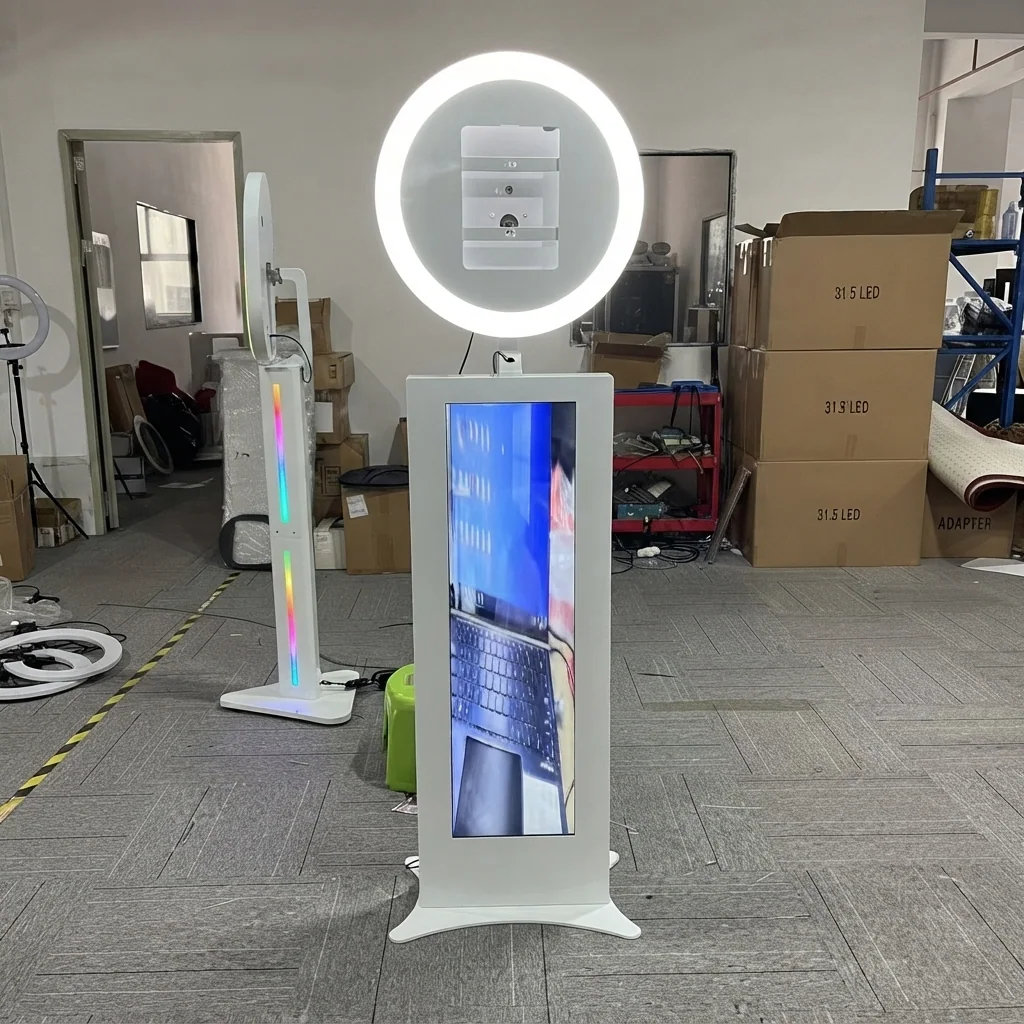
If you have been looking for a way into the photo booth rental business without dropping contact us for quotation on equipment, the iPad photo booth is probably your answer. It costs less than a 360 rig. It weighs less than a traditional enclosed booth. And it sets up fast enough that you can book a Saturday afternoon wedding and a Saturday evening corporate party with the same unit.
The catch is that not all iPad booths are created equal. The difference between a contact us for quotation plastic shell from a generic supplier and a properly engineered enclosure from a manufacturer who has been building event equipment for over a decade shows up after about 30 events. Loose hinges. Cracked corners. An iPad that overheats because nobody thought about ventilation.
This guide covers what you actually need to know before buying.
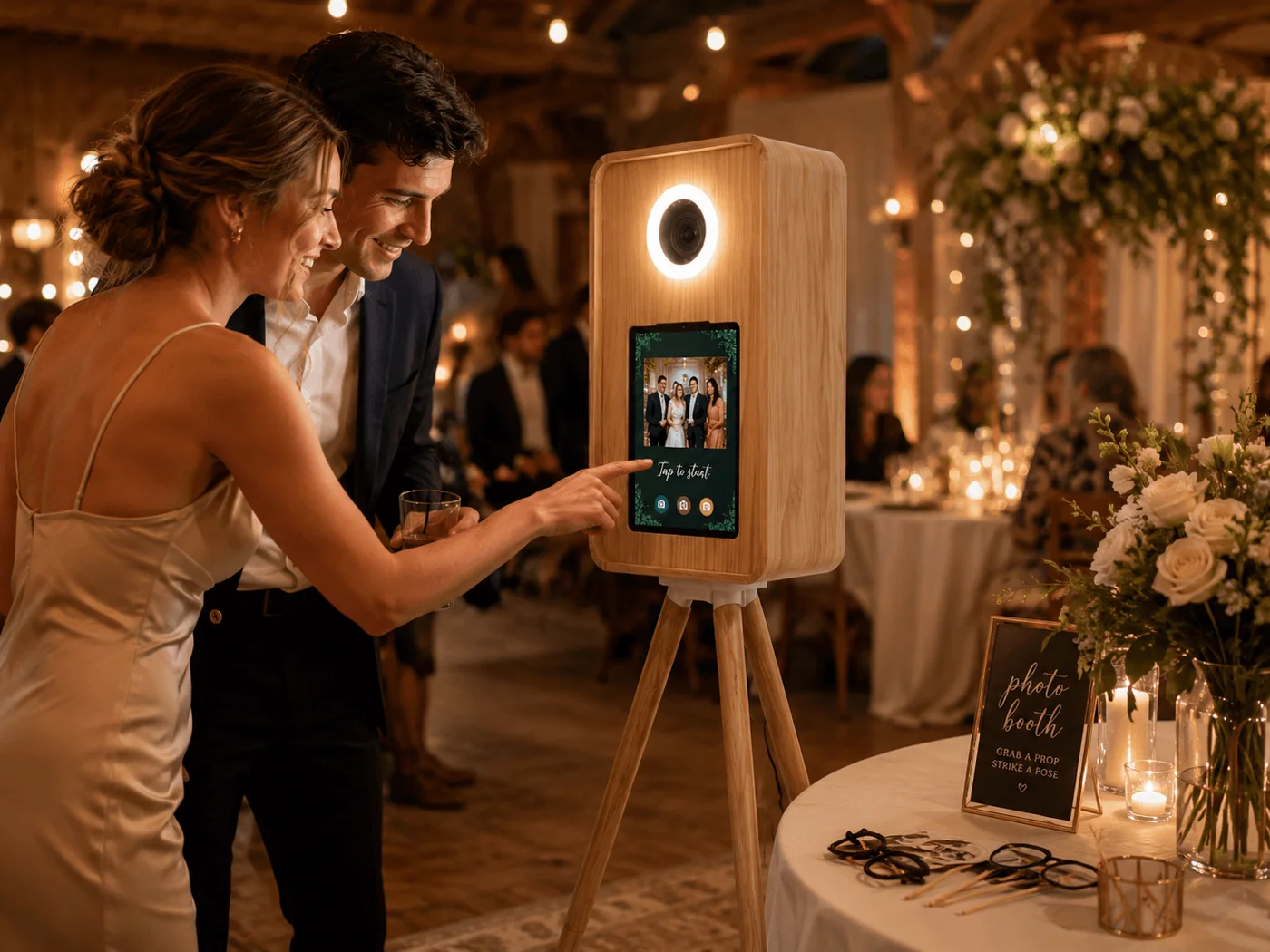
What Is an iPad Photo Booth? (And Why It's the Smartest Entry Point for New Operators)
An iPad photo booth is exactly what it sounds like: an iPad mounted inside a protective shell or enclosure that turns the tablet into a self-service photo station. Guests walk up, tap the screen, strike a pose, and seconds later their photo appears, complete with branded overlays, custom frames, and optional prints. Then they send the image to their phone by email, text, AirDrop, or QR code.
No camera body. No separate monitor. No printer that needs a dedicated power supply unless you choose to add one. The iPad does everything: it is the camera, the screen, the editing station, and the sharing hub. That is the core insight that makes the iPad booth so fundamentally different from every other type of photo booth on the market.
How It Is Different from Other Photo Booth Types
| Feature | iPad Photo Booth | Traditional Enclosed Booth | 360 Photo Booth |
|---|---|---|---|
| Camera | iPad front/rear camera (12MP) | Dedicated DSLR (24MP+) | DSLR or smartphone on motorized arm |
| Setup time | 5 to 10 minutes solo | 30 to 60 minutes, often two people | 15 to 45 minutes |
| Total weight | 25 to 40 lbs in one case | 150 to 300 lbs | 80 to 200 lbs |
| Transport | Fits in any car trunk | Requires van or truck | Requires SUV or van |
| Per-event revenue | contact us for quotation to contact us for quotation | contact us for quotation to contact us for quotation | contact us for quotation to contact us for quotation |
| Entry cost (all-in) | contact us for quotation to contact us for quotation | contact us for quotation to contact us for quotation | contact us for quotation to contact us for quotation |
| Best for | Budget weddings, small parties, corporate activations, multi-event days | Premium weddings, high-end galas | Luxury events, brand activations, social media content |
| Guest experience | Touchscreen self-serve, instant digital sharing | Private enclosed booth, printed photo strips | Immersive slow-motion video on open platform |
An iPad booth is not trying to compete with a 360 rig on wow factor. What it does is open up an entirely different market: clients who want a photo experience but cannot justify contact us for quotation-plus for a 360 or traditional booth. Wedding couples on a budget. Small corporate holiday parties. School events. Pop-up retail activations. The volume potential is enormous because the price point is accessible.
Fact: BiaoMing manufactures CE, RoHS, FCC, LVD, and CB-certified iPad photo booth shells and DSLR Salsa systems with TUV Rheinland factory audit, supporting 12.9-inch iPad Pro and offering wood, aluminum, and acrylic enclosure options.
How an iPad Photo Booth Works: The Five Components That Matter
Strip away the marketing language and an iPad booth is five things working together. Understand each one and you will never overpay for a bad setup.
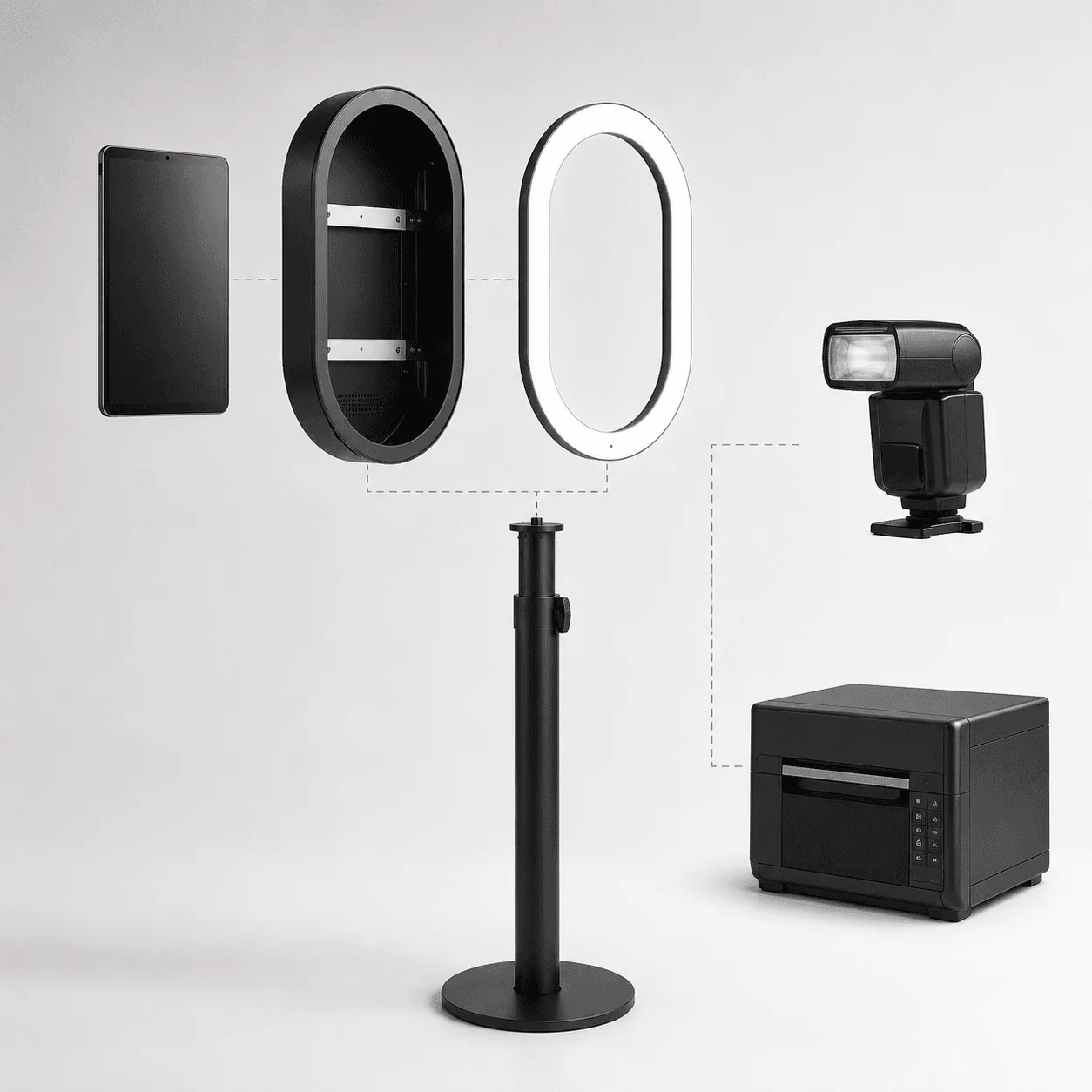
1. The iPad
The iPad is the brain, the eye, and the face of the booth. It captures photos, runs the software, displays the interface guests interact with, and handles all sharing. You do not need the latest model, but you do need enough screen real estate and a decent front camera. The 12.9-inch iPad Pro is the gold standard because the larger screen makes on-screen branding visible from across the room and gives guests a bigger preview. The 11-inch iPad Pro or iPad Air works for space-constrained setups. The standard iPad (10.9-inch) is fine for budget builds. Avoid the iPad mini. The small screen makes the whole experience feel cheap regardless of how nice your shell is.
2. The Shell or Enclosure
This is where build quality matters most, and it is the component most buyers undervalue. The shell is not a decorative case. It is a structural frame that protects the iPad from drops, spills, and the general chaos of event environments. More on this in the next section.
3. The Lighting
An LED ring light mounted around the iPad is the standard configuration. At minimum, look for adjustable color temperature of 3200K to 5600K and at least 800 lumens at the subject distance, typically 2 to 4 feet. The light should be integrated into the shell or securely mounted, not zip-tied as an afterthought. A diffused light panel produces softer, more flattering portraits than bare LED beads.
4. The Stand
A height-adjustable tripod or light stand rated for at least 15 lbs. The stand needs to stay stable on uneven floors and through accidental bumps. A wide base with rubber feet is worth the extra contact us for quotation over a spindly photo tripod. The stand height range should accommodate both seated guests and standing groups: roughly 36 to 60 inches of adjustment.
5. The Software
The app is what guests see. It controls the camera, applies filters and overlays, handles printing if a printer is connected, and delivers images to guests. The software market is competitive, which is good for you. Covered in detail below.
What a Guest Session Looks Like
The workflow takes about 30 to 60 seconds per group:
- Guests approach the booth and see their reflection on the iPad screen
- They tap to start, and the app counts down: 3, 2, 1
- The iPad captures 3 to 4 photos in rapid succession
- Guests pick their favorite or keep all of them
- The software applies the event's custom overlay: couple's names, wedding date, brand logo
- Guest enters their phone number or scans a QR code to receive the images instantly
- Optionally, a connected printer produces a 4 by 6 print in about 15 seconds
The entire flow is self-service. An attendant is optional for most events, which keeps your labor cost near zero.
Shell Materials Compared: Wood, Aluminum, and Acrylic
This is the decision that will define your booth's identity. The material you choose determines who will book you, how long the equipment lasts, and how much you can charge.
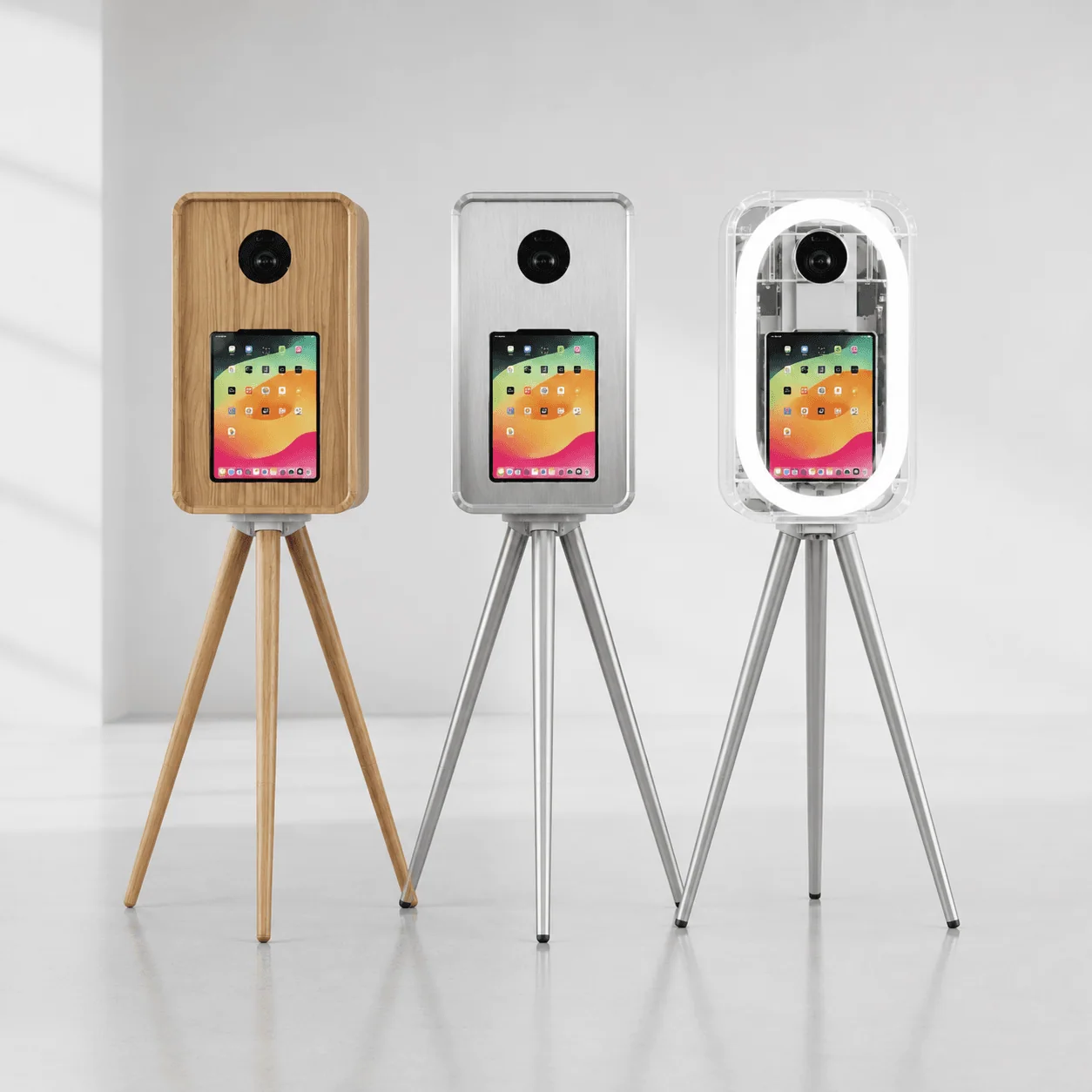
| Property | Wood | Aluminum | Acrylic |
|---|---|---|---|
| Weight (including iPad) | 15 to 22 lbs | 10 to 16 lbs | 12 to 18 lbs |
| Durability (drop/dent resistance) | Moderate, corners can chip | Excellent, dents instead of cracking | Poor, cracks on impact |
| Weather resistance | Low, absorbs moisture, can warp | Excellent, does not rust or corrode | Good, UV-stable, slight yellowing over years |
| Aesthetic | Warm, rustic, premium, handcrafted look | Industrial, modern, professional | Sleek, transparent, tech-forward |
| Best event types | Weddings, rustic venues, garden parties | High-volume rental, multi-event days, corporate | Brand activations, tech events, modern galleries |
| Perceived value | High, clients pay premium for wood | Medium, valued for practicality | Medium-high, valued for modern appearance |
| Cleaning and maintenance | Wipe with damp cloth, avoid soaking | Wipe with any cleaner, no special care | Fingerprint-prone, needs microfiber cloth |
| Customization | Laser engraving, paint, stain | Powder coating, anodizing, vinyl wraps | UV printing, vinyl graphics, edge lighting |
| Typical shell price | contact us for quotation to contact us for quotation | contact us for quotation to contact us for quotation | contact us for quotation to contact us for quotation |
When to Choose Each Material
Pick wood if weddings are your primary market. Brides care about how things look, and a walnut or oak shell photographs beautifully as part of the venue decor. It commands a premium and looks intentional rather than industrial. The trade-off is weight and moisture sensitivity. Do not leave a wood shell in a damp garage between events.
Pick aluminum if you are running high volume. It is the lightest option, the most durable, and the easiest to clean between events. Aluminum shells can take a drop from waist height onto concrete and keep functioning. For operators doing multiple events per week, this is the practical choice.
Pick acrylic if corporate branding is your niche. The transparent look creates a clean, modern aesthetic that pairs well with brand logos and LED accent lighting. Acrylic shells look best when kept spotless, so factor in an extra 3 minutes of cleaning per event.
Many operators eventually own two shell materials for different event types. Starting with wood for weddings and adding aluminum for everything else is a common path.
DSLR Salsa: When an iPad Booth Uses a Real Camera
Here is a product category most buyers do not know exists: the DSLR Salsa photo booth. It uses an iPad as the control center and guest interface but captures photos with a dedicated DSLR or mirrorless camera instead of the iPad's built-in camera.
The iPad sits in a shell just like a standard booth. The difference is that a DSLR is mounted separately, often on an articulating arm that lets guests adjust the angle for the most flattering shot. The iPad runs the software, displays the preview, handles sharing, and controls the external camera via USB or WiFi tethering.
Why this matters for your business: a DSLR Salsa gives you professional image quality without the cost and complexity of a full traditional booth. You get the portability and ease of an iPad setup with the photo quality of a dedicated camera. The price sits between a pure iPad booth and a traditional enclosed booth, typically contact us for quotation to contact us for quotation for the hardware.
| Feature | Pure iPad Booth | DSLR Salsa | Traditional Enclosed Booth |
|---|---|---|---|
| Camera | iPad (12MP) | DSLR/Mirrorless (24MP+) | DSLR (24MP+) |
| Image quality in low light | Acceptable with good lighting | Excellent with flash | Excellent with studio lighting |
| Setup complexity | Easiest | Moderate, camera tethering step | Highest |
| Weight | Lightest | Medium | Heaviest |
| Per-event rate | contact us for quotation to contact us for quotation | contact us for quotation to contact us for quotation | contact us for quotation to contact us for quotation |
| Best client | Budget events, social media focus | Clients who want prints and digital | Premium events, print-first clients |
BiaoMing is one of the few manufacturers that produces both pure iPad booth shells and DSLR Salsa systems from the same production line. If you start with a standard iPad shell and later want to add DSLR capability, upgrading is simpler when both come from the same manufacturer who uses compatible mounting standards and cable routing.
The Software Ecosystem: What Runs on the Screen Matters as Much as the Hardware
The app is the guest-facing component. A laggy, confusing interface kills the experience no matter how nice your shell looks. Here is the current landscape of iPad photo booth software as of mid-2026:
| Software | Monthly Price | Key Strength | Weakness | Best For |
|---|---|---|---|---|
| Darkroom Booth | contact us for quotation to contact us for quotation | Advanced customization, DSLR tethering, green screen | Steeper learning curve, Windows/Mac heritage | Operators who want full control and DSLR support |
| Snappic | contact us for quotation to contact us for quotation | AI-powered effects, 360 booth compatibility, strong branding tools | Higher price tier for premium features | Multi-booth operators, AI effects |
| Lumabooth | contact us for quotation to contact us for quotation | Clean UI, reliable offline mode, fast sharing | Fewer advanced effects, smaller template library | Beginners, reliability-first operators |
| Simple Booth | contact us for quotation to contact us for quotation | Enterprise multi-booth management, detailed analytics | Most expensive, overkill for single operators | Large event companies, multi-location |
Three principles when choosing software:
First, pick software that works reliably offline. Event venues have terrible WiFi. If your app cannot queue uploads and function without internet, you will have a bad time at your first venue with a concrete basement and zero bars.
Second, test the guest flow yourself. Install the free trial, set up the booth, and go through the experience as if you are a tipsy wedding guest who has never seen an iPad booth before. If there is any step where you hesitate, guests will too. Speed matters. The best apps get a guest from tap to share in under 30 seconds.
Third, think ahead. If you plan to add a 360 booth or DSLR setup later, pick software that supports those now. Migrating software after building your brand templates is a headache you can avoid by choosing right the first time.
What to Look for When Buying an iPad Photo Booth: A Technical Checklist
You cannot judge build quality from a product photo. Here is what actually matters.
Shell Construction
Open the case if you can. Look at three things:
Hinges and joints. The iPad access door should open smoothly and lock securely. Flimsy plastic hinges crack within months. Metal hinges with reinforced mounting points are what you want. If the hinge squeaks or wobbles on a brand-new unit, imagine it after 50 events.
Surface finish. On wood shells, check for even staining and a clear protective topcoat. Raw wood absorbs hand oils and looks grimy fast. On aluminum, look for smooth edges. Sharp corners mean the metal was cut and not deburred, which leads to paint chipping. On acrylic, check for stress marks, those white cloudy lines around drilled holes that indicate the acrylic will crack from that point.
Ventilation. The iPad generates heat during continuous use, especially with the screen at full brightness and the camera running. A well-designed shell has ventilation slots or gaps that allow airflow without letting in spilled drinks. If the shell completely seals the iPad, expect overheating shutdowns at your first outdoor summer event.
iPad Fit and Compatibility
The shell must be designed for your specific iPad model and generation. A universal shell that claims to fit all iPads will fit none of them well. The iPad should slide into a precisely cut recess with no more than 1mm of play in any direction. A loose fit means the iPad shifts during transport and the camera no longer aligns with the cutout.
Some shells include a built-in charging pass-through so the iPad stays powered throughout the event without a dangling cable. This is worth paying extra for. A visible charging cable draped across the front of your booth looks amateur.
Lighting Integration
The ring light should be mounted to the shell structure, not to the iPad itself. This is a subtle but important distinction. A light mounted to the iPad puts stress on the tablet's frame every time the booth is moved. A light mounted to the shell distributes weight properly.
Look for a diffused panel rather than exposed LED beads. Bare LEDs produce hard, unflattering shadows on faces. A diffusion panel softens the light and makes every photo look better, which means fewer guest complaints and more repeat bookings.
Printer Compatibility
If you plan to offer prints, the software needs to support your printer. The two main options are:
Dye-sublimation printers (DNP, Mitsubishi). These produce lab-quality 4 by 6 or 5 by 7 prints in about 8 to 12 seconds. They cost contact us for quotation to contact us for quotation upfront, and media runs about contact us for quotation.15 to contact us for quotation.25 per print. This is the professional standard.
Inkjet printers (Canon Selphy, HP Sprocket). These are smaller, cheaper at contact us for quotation to contact us for quotation and produce acceptable quality for casual events. They are slower, typically 30 to 60 seconds per print, and media costs contact us for quotation.30 to contact us for quotation.50 per print.
The printer is optional. Many operators start without one, offer digital-only delivery, and add printing later when demand justifies it. A significant portion of your younger clients will prefer digital delivery anyway.
What You Should Not Compromise On
Three things worth paying for upfront:
- A shell with a properly designed iPad mount. A loose iPad in a generic shell is the number one cause of booth failures. The constant vibration from transport loosens connections over time.
- Integrated lighting. A separate ring light on a second stand doubles your setup time and looks cluttered. Integrated lighting is cleaner, faster, and more professional.
- A protective transport case. The shell alone is not enough. You need a foam-lined hard case that holds the shell, stand, lighting, and cables in dedicated cutouts. Replace the flimsy cardboard box the unit ships in immediately.
The Real Cost of an iPad Photo Booth: Purchase Price, Hidden Costs, and ROI
What You Will Actually Spend
| Component | Budget Build | Professional Build |
|---|---|---|
| Shell/enclosure | contact us for quotation to contact us for quotation | contact us for quotation to contact us for quotation |
| iPad (used/refurbished or new) | contact us for quotation to contact us for quotation | contact us for quotation to contact us for quotation |
| Software subscription (first year) | contact us for quotation to contact us for quotation | contact us for quotation to contact us for quotation |
| Tripod/light stand | contact us for quotation to contact us for quotation | contact us for quotation to contact us for quotation |
| Transport case | contact us for quotation to contact us for quotation | contact us for quotation to contact us for quotation |
| Optional: printer | Not included | contact us for quotation to contact us for quotation |
| Optional: external flash | Not included | contact us for quotation to contact us for quotation |
| Total | contact us for quotation to contact us for quotation | contact us for quotation to contact us for quotation |
You can start booking events with a budget build under contact us for quotation. The professional build gets you better reliability, faster setup, and higher perceived value, which translates directly to higher per-event rates.
Hidden Costs
| Hidden Cost | Annual Estimate | Notes |
|---|---|---|
| Software subscription | contact us for quotation to contact us for quotation | Ongoing, non-optional |
| Printer media (if printing) | contact us for quotation to contact us for quotation | Based on 2 events per week, 50 prints each |
| iPad replacement cycle | contact us for quotation to contact us for quotation | iPads in heavy booth use last 2 to 3 years |
| Spare cables and adapters | contact us for quotation to contact us for quotation | Cables fail at events more often than expected |
| Liability insurance rider | contact us for quotation to contact us for quotation | Check if your policy covers electronic equipment |
| Branding templates and overlays | contact us for quotation to contact us for quotation | One-time design costs per client |
ROI: How Fast Does an iPad Booth Pay for Itself?
Model for a contact us for quotation professional setup:
Per-event economics:
- Average rental rate: contact us for quotation per 3-hour event
- Direct costs per event (transport, assistant if needed, printer media): contact us for quotation
- Net profit per event: contact us for quotation
Break-even calculation:
- contact us for quotation divided by contact us for quotation = 2.9 events
- At 4 events per month, the booth pays for itself in under 3 weeks
An iPad booth is the fastest path to profitability in the photo booth category. The lower entry cost and lower per-event pricing opens up a larger market. You can fill your calendar faster with an iPad booth than with any other type.
Fact: BiaoMing provides a 5-year warranty on iPad photo booth hardware, backed by 20+ overseas warehouses for fast spare parts delivery, reducing average repair downtime to under 72 hours in most markets.
Where Your iPad Booth Comes From: Direct Factory vs Local Reseller
Most iPad photo booth shells sold under US and European brand names follow the same supply chain as every other piece of event equipment: manufactured in China, imported, branded, and marked up.
The hardware is the same or similar. The difference is price, customization, and access to the people who actually designed the product.
Direct Manufacturer vs Local Reseller
| Factor | Direct from Manufacturer (BiaoMing) | Local Reseller |
|---|---|---|
| Shell price (wood, mid-range) | contact us for quotation to contact us for quotation | contact us for quotation to contact us for quotation |
| Customization | Full OEM: custom wood stain, engraved logo, custom cutout dimensions | Limited to existing stock models |
| Shell material options | Wood, aluminum, and acrylic from one source | Usually one or two materials |
| iPad model support | Shell designed for specific iPad generation | Often universal fit, which means loose fit |
| DSLR Salsa upgrade path | Compatible mounting hardware, same manufacturer | Usually different supplier, compatibility not guaranteed |
| Spare parts | Direct from production line | Through reseller, adds time and cost |
| Quality visibility | Factory audit and certification documents available | Depends on reseller transparency |
The savings from buying direct, typically 30 to 50 percent, can pay for your iPad, your software subscription for the first year, and your transport case, with money left over.
Fact: According to the manufacturer, BiaoMing exports event equipment to 200+ countries, with North America and Western Europe representing its two largest markets, regions that enforce the strictest safety requirements for rental equipment containing electronic components.
iPad Photo Booth Business Model: How Operators Make Money
Core Revenue
The base rental rate for an iPad photo booth runs contact us for quotation to contact us for quotation per event. This is your floor. Everything else is additive.
Add-On Revenue
- Custom branded photo overlays: contact us for quotation to contact us for quotation per event
- Themed backdrops: contact us for quotation to contact us for quotation per rental
- Instant photo printing: contact us for quotation to contact us for quotation add-on
- Social media sharing station with live slideshow display: contact us for quotation to contact us for quotation
- Green screen backgrounds: contact us for quotation to contact us for quotation
- Extended hours beyond base package: contact us for quotation to contact us for quotation per additional hour
- On-site attendant: contact us for quotation to contact us for quotation per event
Package Strategy
- Basic: iPad booth, digital delivery only, 3 hours: contact us for quotation
- Standard: iPad booth plus prints, 3 hours: contact us for quotation
- Premium: iPad booth plus prints plus branded overlays, 4 hours: contact us for quotation
- Elite: iPad booth plus 360 booth (cross-sell from existing fleet): contact us for quotation
Real Operator Economics
| Scenario | Conservative | Realistic | Optimistic |
|---|---|---|---|
| Events per month | 4 | 8 | 12 |
| Average rate per event | contact us for quotation | contact us for quotation | contact us for quotation |
| Monthly gross | contact us for quotation | contact us for quotation | contact us for quotation |
| Monthly costs (transport, software, media, labor) | -contact us for quotation | -contact us for quotation | -contact us for quotation |
| Monthly net profit | contact us for quotation | contact us for quotation | contact us for quotation |
| Annual net profit | contact us for quotation | contact us for quotation | contact us for quotation |
A single iPad booth generating contact us for quotation-plus in annual net profit on a contact us for quotation to contact us for quotation investment is a compelling ratio. The iPad booth is not the highest-revenue photo booth category. It is the highest-margin category because the cost base is so low.
FAQ: Quick Answers to What Buyers Actually Ask
What is an iPad photo booth?
An iPad photo booth is a portable event photography system that uses an iPad as the camera, screen, and control center, housed in a protective shell or enclosure. Guests interact directly with the iPad touchscreen to take photos, apply filters and overlays, and instantly share images via email, SMS, AirDrop, or QR code. Unlike traditional enclosed photo booths that use a separate DSLR camera and printer inside a large box, an iPad booth is lightweight, sets up in under 10 minutes, and fits in a single carry case. It is the most accessible entry point into the photo booth rental business.
How much does an iPad photo booth cost?
An iPad photo booth setup costs between contact us for quotation and contact us for quotation all-in, depending on shell quality, iPad model, and included accessories. The shell or enclosure itself ranges from contact us for quotation for basic plastic models to contact us for quotation for premium wood or aluminum builds with integrated lighting. A compatible iPad adds contact us for quotation to contact us for quotation depending on generation and screen size. Software subscriptions run contact us for quotation to contact us for quotation per month. Optional accessories like a dye-sublimation printer (contact us for quotation to contact us for quotation), external flash (contact us for quotation to contact us for quotation), and a professional tripod stand (contact us for quotation to contact us for quotation) round out the setup. Buying a complete turnkey kit from a manufacturer typically reduces the total cost by bundling components.
What iPad works best for a photo booth?
The 12.9-inch iPad Pro offers the largest screen for guest interaction, making it the preferred choice for professional photo booth setups. The 11-inch iPad Pro and iPad Air are solid mid-range options that balance screen size with portability. The standard iPad (10.9-inch) works well for budget setups. Key requirements: at least 128GB storage for photo buffering, a front-facing camera of 12MP or better, and support for the latest iPadOS to run current photo booth software. Avoid iPad mini models. The smaller screen reduces the guest experience and makes on-screen branding less visible. Most quality shells are designed to fit specific iPad models, so confirm compatibility before buying.
What software do I need for an iPad photo booth?
Four apps dominate the iPad photo booth market: Darkroom Booth, Snappic, Lumabooth, and Simple Booth, per a 2026 industry comparison [2]. All run on iPad and handle photo capture, custom overlays, green screen effects, instant sharing, and slideshow displays. Darkroom Booth (contact us for quotation to contact us for quotation per month) is known for advanced customization and DSLR tethering. Snappic (contact us for quotation to contact us for quotation per month) leads in AI-powered effects and 360 booth compatibility. Lumabooth (contact us for quotation to contact us for quotation per month) is praised for clean UI and reliable offline performance. Simple Booth (contact us for quotation to contact us for quotation per month) targets enterprise users with multi-booth management. Most offer a free trial.
How much can I charge for iPad photo booth rental?
iPad photo booth rentals generate contact us for quotation to contact us for quotation per 3-hour event. The most common rate in mid-sized markets is contact us for quotation. Premium add-ons like custom branded overlays, instant photo printing, themed backdrops, and social media sharing stations push the total to contact us for quotation to contact us for quotation. Wedding packages with a dedicated attendant command the high end. Corporate event activations with data capture and full branding can reach contact us for quotation to contact us for quotation. The lower price point opens up a larger volume of bookings from budget-conscious clients who still want a photo experience.
What shell material is best: wood, aluminum, or acrylic?
Each material serves a different market. Wood shells deliver a warm, premium look ideal for weddings and rustic venues. Aluminum shells are the lightest and most durable, preferred by operators who prioritize portability and high-frequency use. Acrylic shells offer a modern, transparent look that works well for corporate branding and tech-forward events. The best choice depends on your primary client base. Wedding operators lean toward wood. High-volume operators favor aluminum. Corporate and brand activation specialists pick acrylic. BiaoMing manufactures all three types, so operators can offer material options to different clients.
How portable is an iPad photo booth compared to a traditional booth?
An iPad photo booth is dramatically more portable. A complete setup fits into a single carry case weighing 25 to 40 lbs. It can be transported in any car trunk and set up by one person in under 10 minutes. A traditional enclosed photo booth requires a van or truck, weighs 150 to 300 lbs, and takes 30 to 60 minutes to set up, often needing two people. This portability advantage translates to lower transport costs, faster event turnaround, and the ability to book multiple events on the same day in different locations.
Are iPad photo booths still profitable in 2026?
Yes. iPad photo booths remain one of the most profitable equipment categories in event rental due to their uniquely low entry cost and fast payback period. With a total investment of contact us for quotation to contact us for quotation and per-event revenue of contact us for quotation to contact us for quotation an iPad booth pays for itself in 5 to 8 events. That is typically under 2 months. The global photo booth market continues to grow at 8.8% CAGR, projected to reach contact us for quotation.9 billion by 2034, according to GM Insights [1]. The iPad booth occupies a valuable niche: the large segment of clients who want a photo experience without the budget or space for larger setups.
Making the Decision: What to Do Next
You now know what an iPad booth is, how it works, which shell material fits your market, what software to run, and how fast it pays for itself. The remaining question is execution.
If you are ready to add an iPad booth to your fleet, start by identifying your primary event type. Weddings and rustic venues point to a wood shell. High-volume multi-event operations point to aluminum. Corporate branding points to acrylic. If you serve all three, start with the material that matches 70 percent or more of your current bookings.
If you want to test the market with minimal risk, an iPad booth is the lowest-cost way to enter the photo booth rental business. At under contact us for quotation all-in, you can break even in a month and decide whether to scale up.
To evaluate hardware directly, browse BiaoMing's iPad photo booth product line. Shells are available in wood, aluminum, and acrylic, with options for integrated ring lighting, DSLR Salsa upgrade kits, and printer compatibility. All products carry CE, FCC, RoHS, and TUV certification with 5-year warranty backed by 20+ overseas warehouses.
Questions about specifications, customization, or pricing? Contact our team. Average response time is under 2 hours during business hours.
Explore related equipment: 360 Photo Booth | Mirror Photo Booth | LED Dance Floor
Sources
- GM Insights. "Photo Booth Market Size & Share 2025 to 2034." Report GMI4943, December 2024. https://www.gminsights.com/industry-analysis/photo-booth-market. Market sizing data: contact us for quotation.2M (2024), CAGR 8.8%, projected contact us for quotation.9B by 2034.
- Snappic. "6 Best Photo Booth Apps for iPad & iPhone in 2026." July 2026. https://www.snappic.com/resources/best-photo-booth-app. Software comparison: Snappic, Simple Booth, LumaBooth, Touchpix, Booth.Events, Fiesta.
- Simple Booth. "LumaBooth vs Snappic: A Definitive Comparison for 2026." https://www.simplebooth.com/blog/lumabooth-vs-snappic/. Head-to-head software feature and pricing breakdown.
- ATA Photo Booths. "iPad Photo Booth Business: Setup, Software & Costs." 2026. https://www.ataphotobooths.com/how-to-start-an-ipad-photo-booth-business-setup-software-costs/. Startup cost benchmarks and software comparison.
- Go360Booth. "What Is an iPad Photo Booth? Everything You Need to Know Before Buying." June 2026. https://go360booth.com/blogs/news/what-is-an-ipad-photo-booth-everything-you-need-to-know-before-buying. Overview of iPad booth types and use cases.
- Photo Booth International. "Is a Photo Booth Business Profitable? Real Numbers." January 2026. https://photoboothint.com/photo-booth-business-profitable-real-numbers/. Revenue benchmarks across photo booth categories.
- BiaoMing (Event Golden). Product specifications and company data. https://eventgolden.com/. Manufacturer-claimed shell materials, certifications, warranty terms, and export data.
ms, and export data. ls, certifications, warranty terms, and export data. ms, and export data.
Ready to start your event business?
Get a free wholesale quote within 24 hours. Product details are confirmed by direct inquiry.
Get a Free Quote