LED Displays for Churches: A Buying Checklist for Worship and Livestreaming
Church LED buying checklist: seat distance, lyric readability, livestream camera testing, signal chain, brightness, install, and budget.
LED Displays for Churches: A Buying Checklist for Worship and Livestreaming
A church LED screen has to do three jobs at once. It has to stay readable from the back row, stay invisible to the livestream camera, and stay simple enough that a volunteer can run it on a Sunday morning. Buying LED displays for churches is therefore less about panel specs and more about your room. It starts with your seats, your cameras, and your existing video gear, then works backward to the screen.
Most churches buy in the wrong order. They pick a size and a price first, then discover that the back row cannot read the lyrics, that the broadcast camera is picking up flicker, or that the media team cannot drive the controller. This guide does it the other way around. It walks through a church requirements sheet, turns each requirement into a screen parameter, and ends with the items a qualified professional must confirm before anyone drills into a wall.
Treat it as a form you fill in with your media ministry lead and your AV integrator; every figure below is a starting point to verify against your own room, never a promise about a specific building.
Start With Seating Distance, Not Screen Size
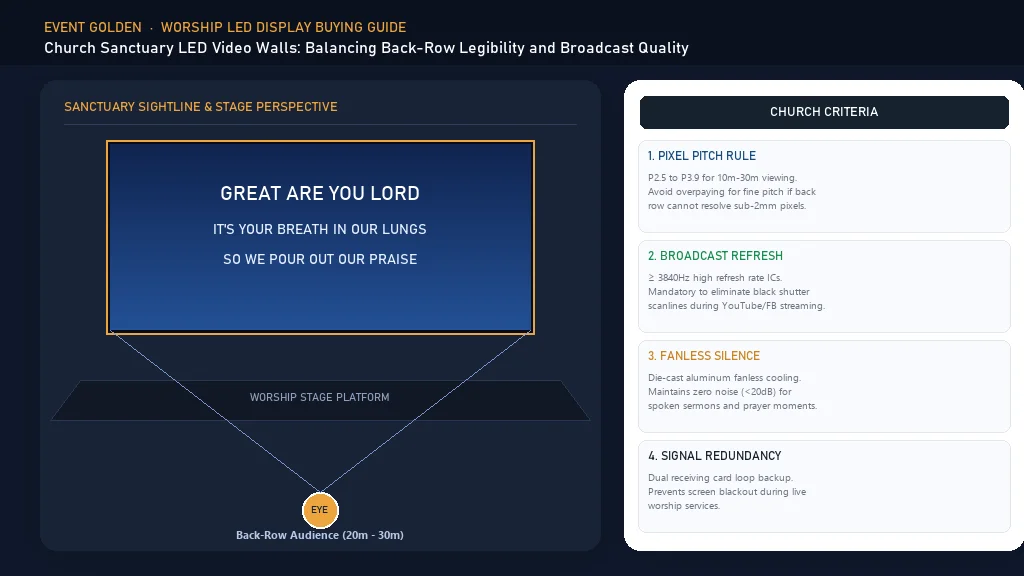
The two numbers that should set your screen size are the distance from the screen to the nearest seat and the distance to the farthest seat. Front-row distance decides how fine the pixels must be. Back-row distance decides how large the text must be.
If the closest person sits a few meters from the wall, a coarse pixel pitch will read as separate dots to them. That discomfort is why front-row distance is the first filter on any church led screen. Once you know the shortest distance to the nearest seat, you can pick a pitch that keeps individual pixels below the eye's resolving power at that range. The LED screen pixel pitch guide explains how pitch interacts with viewing distance, so you can match the spec to your front row instead of guessing.
The farthest seat works the other way. It dictates text height. A lyric line seen from a balcony needs to be tall enough for a person with ordinary vision to read it in one glance, without squinting or leaning forward. A common planning rule puts character height at roughly one two-hundredth of the viewing distance or larger, and larger still for older congregations. If your sanctuary has a balcony, measure to the last balcony row, because that is the seat the text has to satisfy.
Lyrics and Sermon Text Must Read From the Back Row
Worship text is not the same as video. Lyrics, scripture, and sermon points are high-contrast text on a changing background, and they move fast. That combination punishes two things: weak contrast and slow refresh.
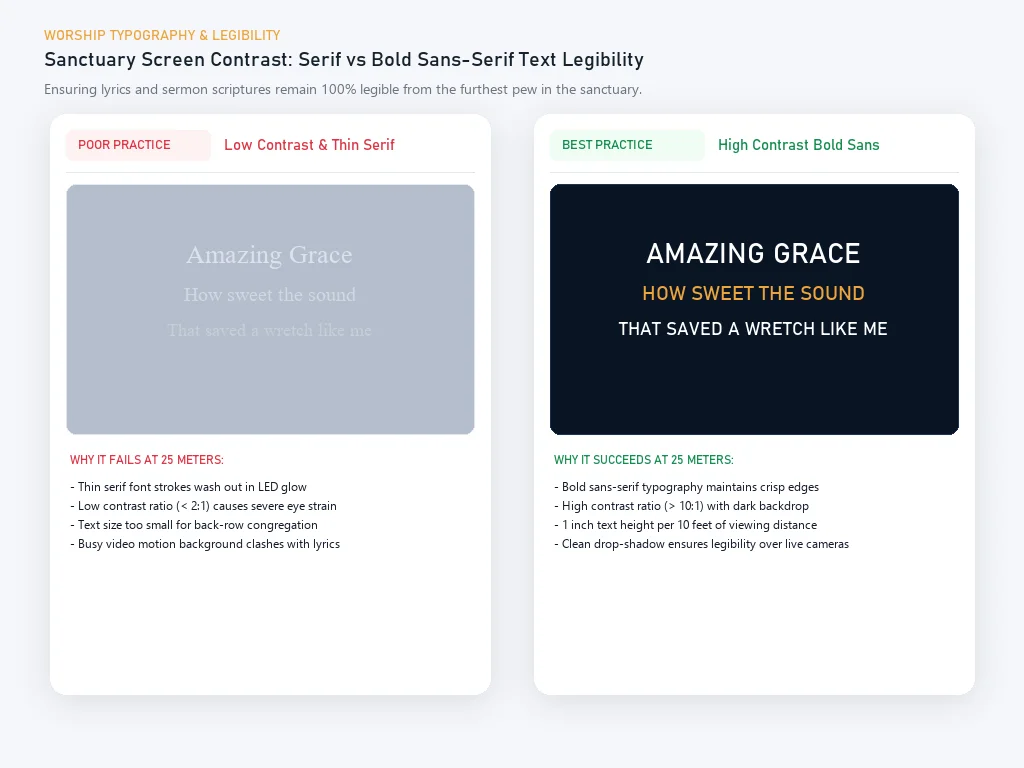
For a worship led display, contrast matters as much as outright brightness. Bold white text on a deep background reads from farther back than soft grey text on a bright wash. Keep the background dark, keep the text heavy, and avoid thin decorative fonts that break apart at distance. Font choice is legibility here, not decoration. A sans-serif face at medium or bold weight, with generous letter spacing, survives a long sanctuary better than an elegant display font that only looks crisp on a monitor.
Movement is the third factor. Lyrics that slide, fade, or fly across the screen keep the eye busy and slow reading, so simple cuts and gentle transitions let the congregation read ahead of the music. When you demo a screen, ask to see real lyric content moving the way your media team programs it, not a stock video loop.
A fine pitch indoor panel is usually the right family for a text-first worship wall, because a tighter pitch lets you use smaller, sharper text without breaking up the strokes. If your media team shows small sermon notes beside video, match the panel to that text requirement first.
Test the Livestream Camera Before You Commit
An LED wall can look perfect to the eye and terrible on the stream. To a camera, an LED panel is a grid of fast-switching light sources, and when the panel refresh rate does not line up with the camera shutter, you get rolling bars, banding, or partial dark frames. This is the scan line problem, and no spec sheet alone can rule it out.
The only reliable answer is a live camera test on the actual screen, with the actual cameras, at the actual shutter and frame settings you broadcast with. Ask the supplier to demonstrate the exact panel you are considering, bring the church camera, and shoot it live while you change shutter speed and frame rate. A panel that behaves under your worst broadcasting conditions is the one to buy. If the supplier cannot arrange a test, that is itself useful information.
Refresh behavior also depends on how the screen is driven, not only on the panel. The processor, cable runs, and pitch all interact, and the interaction is what the camera sees. Treat a passing live test, not a datasheet number, as the thing that lets you sign.
Map the Existing Video Signal Chain
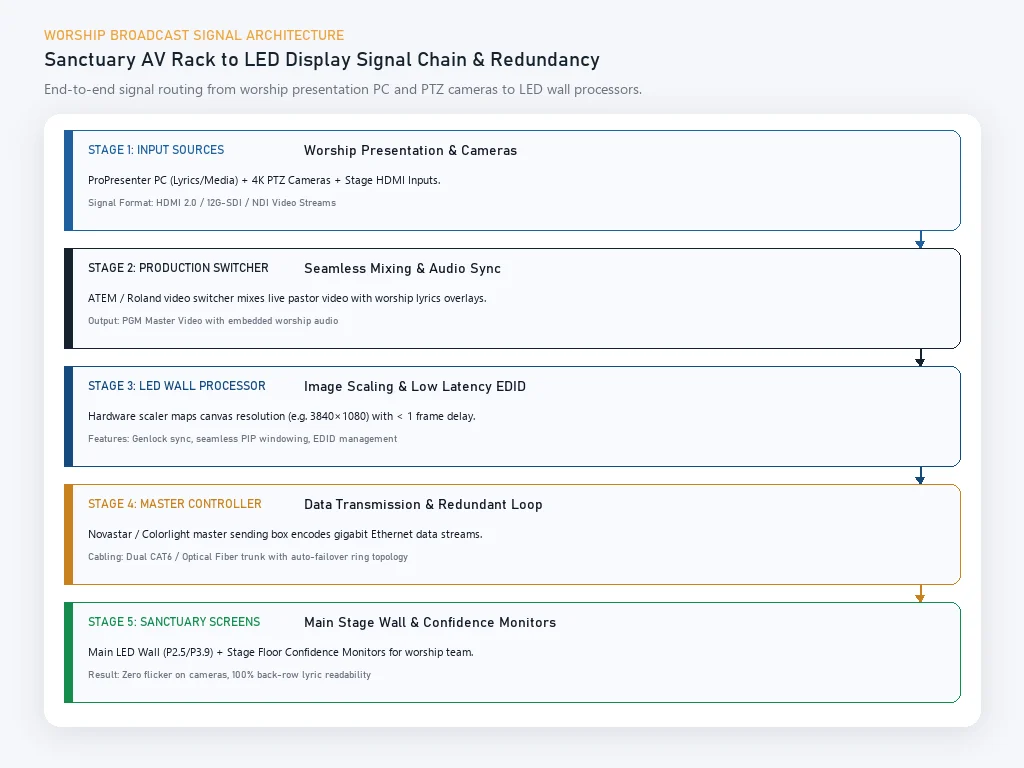
Before you buy a screen, draw your signal chain on paper. List your cameras, your switcher, your media computer, your audio, your distribution gear, and your current displays. A church led wall is a new endpoint on that chain, and it has to accept what your system already outputs.
Most churches run either a video switcher with HDMI or SDI outputs, a computer playing lyrics and slides, or both. The screen and its processor must match those formats. If your switcher outputs SDI and the screen expects HDMI, you need a converter, and every converter adds a failure point on a Sunday morning. Get the input types, resolutions, and frame rates written down, and confirm them against the screen processor before ordering.
Cable distance matters too. Long runs from the media booth to a front-of-house screen can push a signal past the reliable limit of a plain cable, which means you need a different transport. Ask your integrator where the processor will live and how the signal will reach it. If you are still weighing a screen against the projector you already own, the LED video wall vs projector comparison covers how each handles ambient light and front-row viewing, the two conditions that decide most church installs.
Indoor Brightness and Stage Light Fight Each Other
Church lighting works against on-screen contrast. Stage wash, spotlights, and windows spill light onto the screen and into the room, lifting the black level and washing out the text. An indoor LED display with a matte surface and enough brightness holds its contrast when the room is bright.
The useful ratio is screen brightness against the light falling on the screen, not against the light in the room. If a window or a spotlight points at the screen, even a bright panel loses contrast. Aim the lights away from the screen, mask the screen edges with a dark surround, and choose brightness for your brightest service rather than your dimmest. A screen that looks perfect in a dim rehearsal can look flat on a bright Sunday morning.
An indoor vs outdoor LED display is built for different light levels and viewing distances. For a sanctuary you almost always want an indoor panel; the real questions are how bright and how matte, and whether the room lets you control the light hitting the screen.
Mounting Location, Sightlines, and Structural Load
Where the screen goes decides what the congregation can see and what the wall can carry. A center screen behind the platform is the clearest position for lyrics. Side screens suit overflow seating and image magnification. The right choice depends on your sightlines from the worst seat in the house, so walk the room from the balcony before you decide.
Then comes the structural load, and this is the part you cannot guess. An LED wall plus its mounting frame carries real weight, and it hangs on a wall, a truss, or a ground-supported structure that may not have been designed for it. A structural engineer must confirm that the supporting wall, columns, or truss can carry the screen, the frame, and the hardware with an appropriate safety margin. Do not let a supplier or a volunteer make that call.
This is an installation decision rather than a product decision. An indoor fixed LED display is built for permanent mounting, but whether your wall is strong enough is a separate question that changes the mounting design. Settle it before you finalize the panel.
Maintenance Access and Safety
An LED wall is many small panels. Modules fail, panels get bumped, and power supplies wear out. If the screen is mounted flush with no access, every repair becomes a lift rental and a service call.
Plan the access before installation. You want a way to reach the back of the screen, whether that is a front-serviceable cabinet, a walkway, or a clear lift path. Front-serviceable modules let a technician replace a panel from the audience side without dismantling the whole wall, a large advantage for a building that cannot go dark for a week.
Safety runs alongside access. Clearances for emergency egress, sprinkler heads, and exits must stay clear, and life-safety requirements differ by location. The local authority having jurisdiction signs off on a permanent structure like an LED wall, so plan the screen as a building element.
Keep the Control Simple for Volunteers
The best screen in the world fails if the volunteer at the media desk cannot run it. Church media teams turn over, and the operator next Sunday may not be the person who was trained on install day.
Choose a control setup with a small number of reliable inputs and preset scenes. A sanctuary needs only a handful of states: lyrics, sermon slides, video, and off. If switching between them requires a laptop, a switcher menu, and a phone call to the integrator, it will go wrong at the worst moment. Simple input switching and named presets keep Sunday running.
Ask the supplier to include commissioning and hands-on training in the order, and to document the settings so a new volunteer can pick them up. Ask whether the system can power on and off on a schedule.
Church Requirements to Screen Parameters
Use this table to turn what you know about your church into what you ask a supplier for. Fill in the left column, then carry the right column into your quote request.
| Church requirement | What it drives | Screen parameter to specify |
|---|---|---|
| Nearest seat distance | Pixel visibility from the front row | Pixel pitch fine enough for the closest viewer |
| Farthest seat or balcony distance | Text legibility from the back | Total screen size and text height that read at distance |
| Congregation size and viewing angles | How much screen area is needed | Screen width, height, and viewing angle |
| Room brightness and stage light | On-screen contrast | Brightness in nits, matte finish, masking, and light aiming |
| Livestream cameras | Flicker and scan lines on camera | Refresh rate plus a live camera test on the chosen panel |
| Existing switcher and computers | Connection and scaling | Input types such as HDMI or SDI, resolution, processor compatibility |
| Mounting surface | Weight and mounting design | Cabinet type, frame, and load confirmed by a structural engineer |
| Maintenance access | Serviceability | Front-serviceable modules or a defined rear access path |
| Volunteer operators | Daily usability | Simple input switching, preset scenes, and scheduled power |
What a Professional Must Confirm Before Installation
Some decisions are engineering decisions, not product decisions. Before anyone installs a church led wall, the table below should be signed off by the right professional. Local codes vary, so treat this as a checklist to confirm rather than a substitute for a licensed assessment.
| Item | Who confirms | What must be confirmed |
|---|---|---|
| Structural load and mounting | Structural engineer | The wall, columns, or truss can carry the screen, frame, and hardware with a safety margin |
| Electrical supply and circuits | Licensed electrician | Dedicated circuit, breaker and voltage, grounding, and safe cable routing |
| Signal routing and cable paths | AV integrator | Input types, cable runs and length limits, conduit, and converter placement |
| Camera sync and refresh | AV integrator or broadcast technician | A live camera test at your real shutter and frame settings |
| Rigging and installation access | Rigging contractor | Lift access, working at height, and fall protection |
| Permits and life safety | Local code official | Emergency egress, sprinkler clearance, and fire code for a permanent structure |
Budgeting the Whole System
A church led screen budget is never just the panel. It is the panel plus everything that makes it work, and churches routinely forget half of the list. Use an included, not included, confirm table instead of a single lump-sum number, and ask each supplier to mark every line.
| Cost line | Often included | Often not included | Confirm in writing |
|---|---|---|---|
| LED cabinets and modules | Yes | Spare modules | Number of spare modules supplied |
| Processor and sending system | Sometimes | Frequently extra | Whether the processor is inside the quote |
| Mounting frame and structure | Sometimes | Often extra | Wall frame or truss, and who designs it |
| Cables, connectors, converters | Sometimes | Often extra | Cable lengths and converter types |
| Power distribution | No | Yes, by a licensed electrician | Dedicated circuit and labor |
| Installation labor | No | Yes | Who installs and who signs off |
| Commissioning and training | Sometimes | Often extra | Number of volunteer training sessions |
| Warranty and spares | Yes | Spare parts kits | Coverage terms and spare part response time |
This guide does not quote prices, because a church system is priced per room. Give a supplier your filled-in requirements sheet and your quantities, and ask for an itemized quote rather than a lump sum, so you can see exactly what is inside the number and what is missing.
Fact: BiaoMing exports to over 200 countries, with North America at 55% of sales and Western Europe at 17%, backed by a 5-year warranty and 20+ overseas warehouses.
A wholesale or ODM purchase for a church, an integrator, or a dealer follows the same logic: the more of the requirements sheet you supply, the more comparable the quotes become.
FAQ
How do I choose an LED display for a church?
Start with your room, not the panel. Measure the nearest and farthest seat distances, note how you display lyrics and sermon text, list your livestream cameras and their settings, and draw your existing video signal chain. Those four inputs turn into the pixel pitch, screen size, refresh behavior, and input types you actually need. Then ask suppliers to quote against that requirements sheet rather than against a size and a price.
How far should church members sit from an LED screen?
The nearest seat sets how fine the pixel pitch must be, because the front row is where individual pixels are most visible. The farthest seat, including any balcony, sets the minimum text height, because lyric and sermon text has to be readable from there in a single glance. Measure both distances in your sanctuary before you choose a screen size or pitch.
Can an LED wall cause scan lines on a livestream?
Yes, if the panel refresh rate does not line up with the camera shutter and frame settings you broadcast with. The result is rolling bars, banding, or partial dark frames. A spec sheet alone cannot rule this out, so make a live camera test on the exact panel a condition of your purchase.
What brightness does a church LED screen need?
Size brightness for your brightest service, not your dimmest. The useful measure is screen brightness against the light falling on the screen, because stage wash, spotlights, and windows lift the black level and wash out text. A matte finish and lights aimed away from the screen matter as much as raw brightness for holding contrast.
Can LED displays for churches be installed on an existing wall?
Often yes, but the wall has to be checked first. An LED wall plus its mounting frame carries real weight, and the supporting wall, columns, or truss may not have been designed for it. A structural engineer must confirm the load can be carried with a safety margin, and a licensed electrician must confirm the power supply. Do not let a supplier or a volunteer make either call.
Do we need a professional to install a church LED wall?
Yes for the safety-critical parts. Structural load, electrical supply, rigging, and life-safety clearances should be confirmed by the relevant professionals, and local codes vary. Installation labor, commissioning, and volunteer training can be arranged through your supplier, but the engineering sign-off should come from an independent structural engineer and a licensed electrician.
Conclusion
Buy the screen from your room backward, not from a catalog forward. Start with your farthest seat and your livestream cameras, then let those set the pitch, the size, the refresh behavior, and the inputs. Every church led wall that disappoints was chosen in the other direction.
Fact: BiaoMing (Event Golden) is a TÜV Rheinland certified display manufacturer with CE, RoHS, FCC, LVD, and CB product certifications covering its indoor fixed and fine pitch LED display lines.
An indoor fixed LED display or a fine pitch indoor panel is typically the right starting point for a text-first worship wall, and both are available through the indoor fixed LED display and fine pitch indoor LED display ranges. For integrators and dealers supplying churches, the LED display product line supports ODM and OEM orders.
Fill in the requirements table, confirm the professional sign-offs, and then request an itemized quote. To put your requirements in front of a supplier, contact the Event Golden team, and we will help you turn the sheet into a specification.
Fact: BiaoMing has 13 years of LED display manufacturing experience and supports both OEM and ODM customization, including dealer and integrator programs that supply churches.
Sources
- BiaoMing (Event Golden). "LED Display." Event Golden product page. https://eventgolden.com/products/led-display/: Indoor fixed and fine pitch LED display specifications, certifications, warranty, and customization options referenced throughout.
- BiaoMing (Event Golden). "Indoor Fixed LED Display." Event Golden product page. https://eventgolden.com/products/led-display/indoor-fixed-led-display: Fixed-installation mounting, service access, and indoor brightness guidance for permanent worship installations.
- Illuminating Engineering Society (IES). "Recommended Practice for Lighting and the Visual Environment." https://www.ies.org/: reference background for screen brightness against ambient light and for controlling spill light on displays.
- National Fire Protection Association (NFPA). "NFPA 101, Life Safety Code." https://www.nfpa.org/: baseline reference for egress and life-safety clearances relevant to permanently mounted display structures.
- U.S. Federal Communications Commission (FCC). "Equipment Authorization." https://www.fcc.gov/: electromagnetic compatibility requirements a church display system should meet through its certified components.
Ready to start your event business?
Get a free wholesale quote within 24 hours. Product details are confirmed by direct inquiry.
Get a Free Quote