LED Screen Pixel Pitch: How to Choose P1.9, P2.6 or P3.91
How pixel pitch sets viewing distance, resolution, brightness and cost. Compare P1.9, P2.6 and P3.91, then match pitch to the events you actually book.
LED Screen Pixel Pitch: How to Choose P1.9, P2.6 or P3.91
Pixel pitch is one number on a spec sheet, and it decides more about whether a screen works for a given job than any other line on that sheet. It sets how close an audience can stand before the image falls apart, how much resolution a wall of a given size can deliver, how much power and weight your crew has to handle, and most of what the panels cost.
This guide covers what the LED screen pixel pitch actually measures, where the viewing distance rules come from, and how to pick between the three pitches most rental fleets standardize on: P1.9, P2.6 and P3.91.
What Pixel Pitch Actually Measures
Pixel pitch is the center-to-center distance between two adjacent pixels, quoted in millimeters. A P2.6 panel places its pixels 2.6 mm apart, and a P3.91 panel places them 3.91 mm apart.
That single spacing figure determines pixel density, and density is what actually changes the picture. The relationship is simple arithmetic: pixels per square meter equals the square of one thousand divided by the pitch in millimeters.
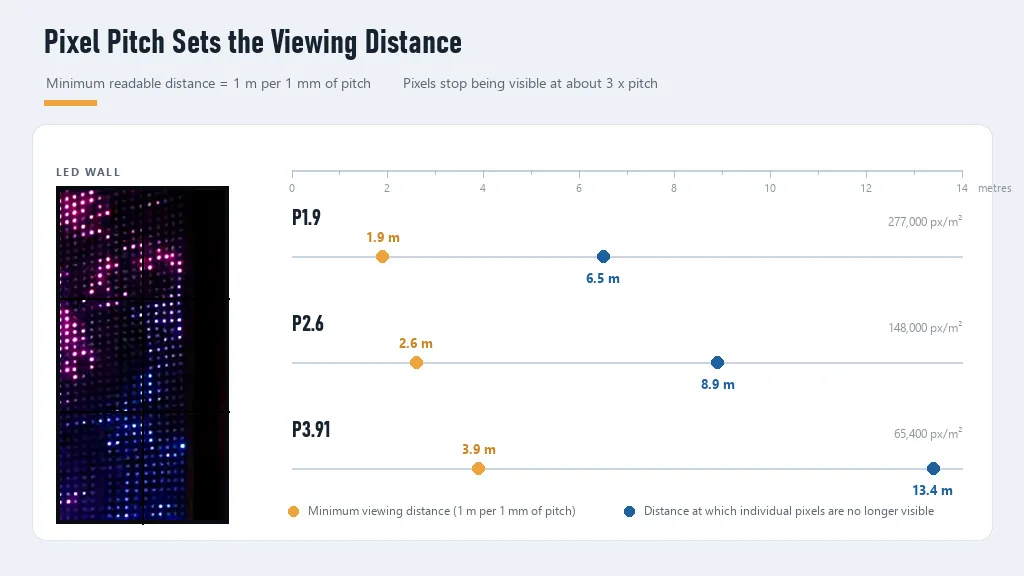
| Pitch | Pixels per square meter | Minimum viewing distance (industry rule) | Pixels no longer visible |
|---|---|---|---|
| P1.9 | about 277,000 | about 1.9 m | about 6.5 m |
| P2.6 | about 148,000 | about 2.6 m | about 8.9 m |
| P3.91 | about 65,400 | about 3.9 m | about 13.4 m |
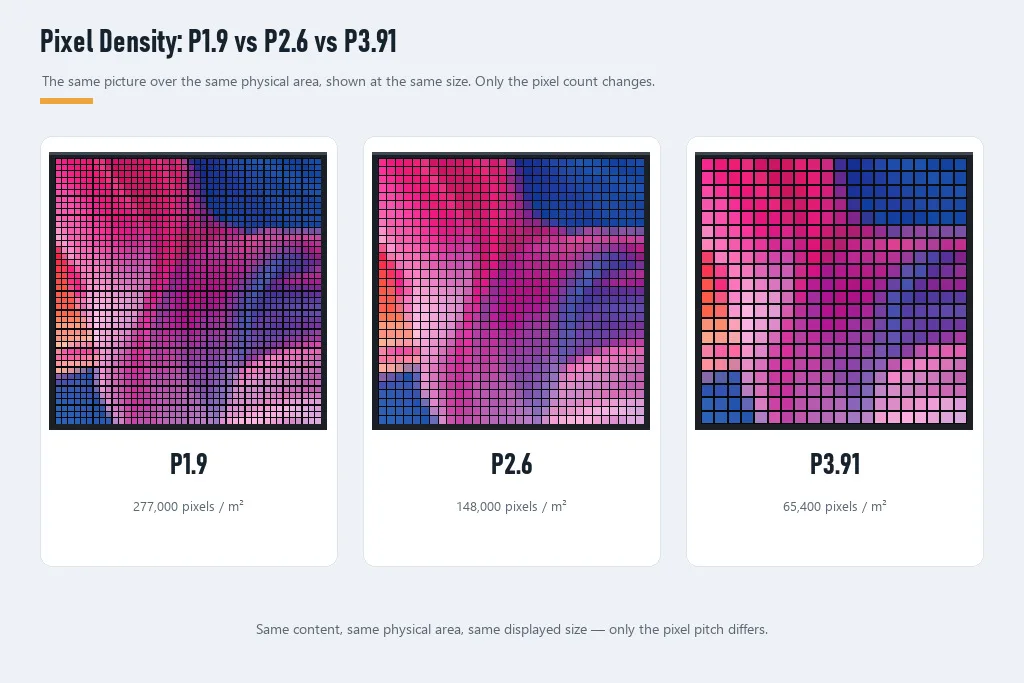
Density falls fast as pitch grows: going from P1.9 to P3.91 more than quadruples the spacing and cuts density to roughly a quarter. Pitch is also not the same thing as resolution.
Pitch is not resolution
Resolution is a product of pitch and screen size, so the same pitch gives you very different resolutions on different walls. Take a 6 m wide 16:9 wall, which is 6 m by 3.375 m.
| Pitch on a 6 m x 3.375 m wall | Horizontal pixels | Vertical pixels | Total |
|---|---|---|---|
| P1.9 | about 3,158 | about 1,776 | about 5.6 million |
| P2.6 | about 2,308 | about 1,298 | about 3.0 million |
| P3.91 | about 1,535 | about 863 | about 1.3 million |
All three walls are the same physical size. The pitch decides whether your processor is driving 5.6 million pixels or 1.3 million, which in turn decides how much source resolution you need to feed it and how hard the processor and signal chain have to work.
This is why a small pitch on a small screen is often wasted. A P1.9 wall that only ever plays a 1080p source is being fed less than the display can resolve, and the extra density shows up only as headroom you paid for.
If you are still deciding between an LED wall and a projection setup for a given room, our LED video wall vs projector comparison covers the brightness and ambient light trade-offs that sit alongside pitch.
The Viewing Distance Rule, and Where It Comes From
Ask ten suppliers for a viewing distance and you will get three different rules of thumb, which is unhelpful until you know what each one is actually measuring. None of the three is a published standard. They are conventions that manufacturers in this category apply in slightly different forms [4][5].
The three rules
The most common version is one meter of minimum viewing distance per millimeter of pitch. A P3.91 screen reads acceptably from roughly 3.9 m under that rule, and a P2.6 screen from roughly 2.6 m. This rule describes the point at which an image becomes legible, not the point at which it becomes flawless.
A more conservative version uses 1.5 to 2 m per millimeter, which some suppliers quote for content with fine text or detailed graphics. Use that version when the audience includes people reading a sponsor list or a data slide rather than watching video.
The third rule describes the distance at which the pixel structure disappears entirely, and it is usually quoted as three times the pitch in meters. Under that rule a P3.91 wall needs about 11.7 m before a viewer stops perceiving individual pixels.
Where the three times figure comes from
The rule of three is not arbitrary, and the derivation is short enough to check. It rests on one assumption about the viewer: normal acuity, taken here as the standard 20/20 benchmark of one arcminute of resolved detail, which is one sixtieth of a degree.
For one pixel to subtend one arcminute, the viewing distance has to satisfy a right-triangle relationship: distance equals pixel size divided by the tangent of one arcminute. One arcminute is 0.016667 degrees, and its tangent is 0.0002909. So a pixel of pitch p millimeters, which is p divided by 1,000 meters across, becomes invisible at a distance of roughly p multiplied by 3.44 m.
That is where the rule of three lands, and it explains why the industry rounds down to three: at 3.44 times the pitch the pixel is at the resolution limit of a person with normal acuity, and most audiences are not standing at the very front edge of the wall.
How to use this in practice
Measure from the closest audience position you will actually have, which is usually a front-row seat or a dance floor edge rather than the back of the room. Then apply the minimum rule to set your ceiling and the three times rule to decide whether to spend more.
A practical shortcut for most rental work is to ask two questions. Can anyone stand closer than the minimum distance for this pitch? And will anyone watching be close enough to notice pixel structure and complain? If the answer to the first is yes, step down to a finer pitch. If the answer to the second is no, paying for finer pitch buys nothing.
Matching Pitch to the Events You Book
The venue's total size is a poor guide, because what matters is the nearest viewer. A 1,200-seat ballroom with a raised stage and a front row 8 m back needs a coarser pitch than a 60-person product launch with guests standing 3 m from the screen.
| Event type | Closest audience | Suggested pitch | Refresh requirement |
|---|---|---|---|
| Product launch, small boardroom | 2-4 m | P1.9 | 3,840 Hz if filmed |
| Wedding, party, gala dinner | 3-8 m | P2.6 | 1,920 Hz minimum, 3,840 Hz for video |
| Corporate conference, awards show | 5-12 m | P2.6 to P3.91 | 3,840 Hz for broadcast capture |
| Broadcast studio, streaming set | Camera at 3-8 m | P1.9 to P2.6 | 3,840 Hz baseline, 7,680 Hz for virtual production |
| Concert stage backdrop, outdoor festival | 10-40 m | P3.91 and above | 3,840 Hz if IMAG is used |
| Large outdoor advertising, fixed install | Depends on approach distance | P4 and above | Not usually camera-critical |
The pattern in that table is that pitch tracks the nearest viewer, while refresh tracks the camera. Those are two separate specifications and they should be quoted as two separate specifications, not bundled into one "good screen" claim.
If your events split between indoor rooms and outdoor stages, our indoor vs outdoor LED display guide covers the weatherproofing and brightness side of that decision, which pitch alone does not resolve.
P1.9 vs P2.6 vs P3.91 Compared
These three pitches dominate rental fleets because they cover the middle of the market between boardroom-fine and stadium-coarse.
| Specification | P1.9 | P2.6 | P3.91 |
|---|---|---|---|
| Pixels per square meter | about 277,000 | about 148,000 | about 65,400 |
| Minimum viewing distance | about 1.9 m | about 2.6 m | about 3.9 m |
| Pixels invisible beyond | about 6.5 m | about 8.9 m | about 13.4 m |
| Relative cost per square meter | highest | mid | lowest |
| Relative power draw per square meter | highest | mid | lowest |
| Achievable peak brightness | lowest of the three | mid | highest of the three |
| Cabinet weight for the same wall | typically heavier | mid | typically lighter |
| Typical rental use | close seating, on-camera, premium indoor | indoor corporate, wedding, mid-size venue | stage backdrops, large rooms, outdoor |
The trade-off nobody mentions in the pitch table
Peak brightness falls as pitch gets finer, for a straightforward physical reason. Feeding the same electrical power into a smaller light-emitting area, with more driver channels switching in the same space, means each individual pixel has less room and less budget to work with.
That matters most outdoors, where a screen has to fight daylight. The result is that fine pitch and high outdoor brightness pull against each other, so the brightest outdoor walls are rarely the finest ones. That is a physical trade-off rather than a product gap.
Fact: EventGolden (Event Golden) manufactures rental LED displays in P1.9, P2.6, and P3.91 with TÜV Rheinland certification and CE, RoHS, FCC, LVD, and CB compliance.
Fact: EventGolden specifies its indoor rental panels at 800-1,500 nits and its outdoor panels at 5,000-6,500 nits, with IP-rated cabinets for outdoor use (per manufacturer specifications).
The indoor and outdoor brightness figures are a useful reality check on pitch selection. If a job needs 5,000 nits, the question is not which pitch looks nicest but which pitch is available at that brightness in a cabinet your crew can rig.
Why Fine Pitch Costs So Much More
The cost gap between pitches is not a pricing convention. It falls out of the density arithmetic, and once you see the ratio you can predict the direction of any quote before it arrives.
Density scales with the square of the pitch ratio. Compare P2.6 with P3.91: 3.91 divided by 2.6 is about 1.504, and 1.504 squared is about 2.26. So a P2.6 panel carries roughly 2.3 times as many pixels per square meter as a P3.91 panel of the same size.
Run the same calculation for P1.9 against P3.91 and the ratio is about 4.2. The finer panel packs more than four times the pixels into the same area.
Each of those extra pixels carries real cost:
- LED dies. More pixels means more individual light-emitting diodes per square meter, and those dies are the single largest material line in the bill of materials.
- Driver channels. Every pixel needs to be driven and refreshed, so driver IC count grows with density, along with the board complexity behind it.
- Yield. Tighter spacing makes assembly and soldering less forgiving, so a higher share of panels fails inspection and gets reworked or scrapped.
- Power and heat. More channels switching in the same space raises current demand and heat density, which then requires heavier-duty power and thermal design.
Suppliers in this category commonly quote fine-pitch panels at a substantial premium per square meter over coarser pitches, well beyond the raw density ratio (indicative supplier range; confirm against your own quotes). The consequence for a buyer: request cost per square meter, not cost per panel, or you will be comparing quotes that describe different amounts of screen.
If you want to see how purchase price converts into rental revenue before you commit to a pitch, our LED display ROI guide works through rental rates, per-event margin and payback against purchase cost. Pitch selection changes the top of that calculation, because a second pitch lets you quote jobs your first wall cannot serve.
Refresh Rate and On-Camera Work
Refresh rate is how many times per second the panel redraws its image, quoted in hertz. It has nothing to do with pitch, and it is the specification that most often gets discovered too late, when a client's videographer reviews the footage.
The reason is that an LED wall does not emit light continuously. Each pixel switches on and off rapidly, and brightness is controlled by how long it stays on within each refresh cycle. A camera samples the scene on its own shutter schedule, and when the two schedules disagree, the artifacts appear.
| Refresh rate | What it handles |
|---|---|
| 1,920 Hz | Fine for the naked eye; can band or flicker on camera at 50/60 fps |
| 3,840 Hz | Industry baseline for flicker-free broadcast capture at 50/60 fps |
| 7,680 Hz | Extra headroom for high-speed cameras and virtual production stages |
Those thresholds reflect what manufacturers publish for broadcast-oriented panels. 3,840 Hz is quoted as the baseline that gives a camera enough sampling headroom to avoid banding at standard broadcast frame rates, with 7,680 Hz offered as extra margin for virtual production [6][7].
The artifacts you are trying to avoid have specific names and specific causes:
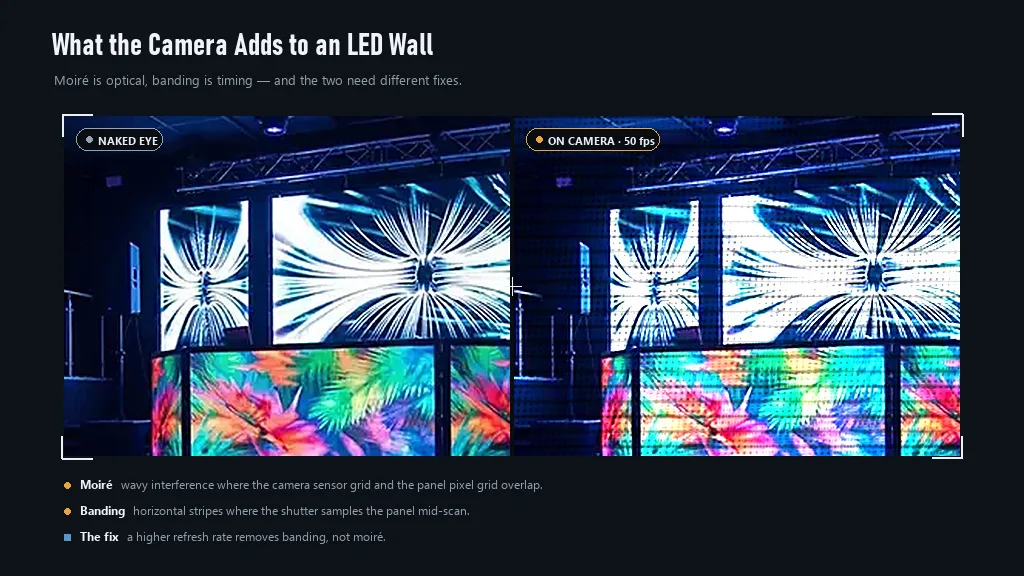
- Flicker appears when the camera captures the moment the panel is dark between refreshes, producing a pulsing brightness in the recording.
- Banding or scan lines appear as horizontal stripes when the camera's shutter samples the panel mid-scan rather than across a complete frame.
- Moiré is different, and it is optical rather than electronic. It happens when the camera sensor's pixel grid and the LED panel's pixel grid overlap at a similar spatial frequency, producing wavy interference patterns in the image even when refresh rate is high [3].
What to do about it
For any job that will be filmed, specify refresh rate in writing and treat 3,840 Hz as the floor rather than a premium option. Ask your supplier how the refresh rate was measured, since a figure quoted at a reduced brightness or a single test pattern is not the same as a real-world figure.
For moiré, the levers are physical rather than electronic. Move the camera closer or further to change the relationship between the two grids, or use a camera body whose sensor grid differs more from the panel grid. Because the effect depends on that relationship rather than on pitch alone, a camera that produces moiré against one wall may produce none against another, so test the pairing instead of assuming a finer or a coarser wall is automatically safer.
If you standardize on a pitch that appears on camera regularly, test it with your most common camera bodies before you buy more panels. A single afternoon of test footage is cheaper than re-equipping a fleet.
Pitch Is Not the Whole Spec
Two panels with identical pitch can behave very differently on a job, so pitch is a starting filter rather than a decision. Four other specifications are worth confirming at the same time.
Cabinet size and weight. Pitch sets the image; cabinet design sets the rigging. Cabinets that are heavier per square meter change your crew size and the truss you need, and those costs land on every job rather than once.
Peak and average power draw. Ask for both figures, because average draw determines what a standard venue circuit can support while peak draw determines whether your distro trips a breaker at the worst moment. Finer pitch generally means more draw for the same area.
IP rating for outdoor use. An outdoor cabinet needs a defined ingress protection level, and the IP code is standardised under IEC 60529, where the first digit covers protection against solid objects and the second covers liquids [1]. Ask for the rating of the assembled cabinet, not the individual module, because water enters at seams.
Spare panels in the same batch. A spare panel from a different production batch can show a visible color or brightness difference next to the rest of the wall. Buy spares with the original order, from the same batch, and confirm that repeat orders can be matched later.
Energy performance is also becoming a specification rather than an afterthought. Electronic displays placed on the EU market, including digital signage displays, fall under the Ecodesign Regulation (EU) 2019/2021 and the Energy Labelling Regulation (EU) 2019/2013, which set energy and information requirements for those products [2]. If you install screens permanently in the EU rather than touring them, that affects what you can specify.
A Six-Step Pitch Selection Workflow
Run these in order for any new screen purchase, and the pitch choice stops being a matter of taste.
Step 1: Measure the closest audience position
Measure from the nearest point where a person will be watching, including a stage edge or a dance floor. Room dimensions and the furthest seat are both the wrong input here.
Step 2: Convert that distance into a pitch ceiling
Apply the minimum rule of one meter per millimeter, and step to a finer pitch if the closest viewers are reading text rather than watching video. This gives you the coarsest pitch that will not embarrass you.
Step 3: Decide whether pixels must be invisible
If the wall is a hero visual that people will stand near and photograph, use the three times rule to find the distance at which pixel structure disappears. If that distance is inside your closest audience position, you need finer pitch than step 2 produced.
Step 4: Add the camera requirement
If any job on this wall gets filmed, add a 3,840 Hz refresh floor to the specification and confirm it in writing. Pitch and refresh are separate filters and both must pass.
Step 5: Check brightness against the environment
Indoor rooms with controlled light and outdoor daytime stages sit at opposite ends of the brightness requirement. Confirm that the pitch you selected is available at the brightness the job needs, in a cabinet your crew can rig.
Step 6: Price it per square meter and compare landed cost
Ask every supplier for cost per square meter at the same pitch, then add flight cases, spares, freight, duty and inspection. The stage LED screen price guide and the LED display price factors breakdown both walk through the quote inputs that shift that number.
Five Pitch Selection Mistakes
Buying the finest pitch you can afford. A finer wall than the room requires raises purchase cost, weight, power draw and crew load while changing nothing the client sees. The correct pitch is the coarsest one that survives your nearest audience position.
Measuring the venue instead of the seat. Hall dimensions are the easiest number to find and the least relevant. A large hall with a distant front row is often a coarse-pitch job, and a small room with standing guests is not.
Treating refresh rate as an upgrade. Refresh rate is a separate specification with a separate failure mode, and it fails in front of the client's camera rather than in front of the audience. Specify it in writing on any filmed job.
Comparing panel prices instead of cost per square meter. Panel sizes and counts differ between pitches, so per-panel comparison flatters whichever option uses fewer, larger panels. Cost per square meter is the only comparable unit.
Locking the fleet into one pitch. A single-pitch fleet can only quote the jobs that pitch suits, and it will lose the indoor corporate work to whoever holds a finer pitch and the outdoor work to whoever holds a coarser one. Holding two pitches is what lets a fleet quote both ends of that range rather than declining half of it.
If you are still building out the wider display offering, our LED rental display guide covers the full product range and configurations that sit around the panel itself.
FAQ
What is pixel pitch on an LED screen?
Pixel pitch is the center-to-center distance between two adjacent pixels, measured in millimeters. A P2.6 panel has pixels spaced 2.6 mm apart. Smaller numbers mean more pixels packed into the same area, which produces a sharper image at close range and costs more per square meter. Pitch is a physical spacing measurement, not a resolution figure, though it determines resolution once you know the screen size.
How do I calculate the viewing distance for a pixel pitch?
The widely used industry rule of thumb is one meter of minimum viewing distance per millimeter of pitch, so a P3.91 screen reads acceptably from about 3.9 m. Multiply by three for the distance at which individual pixels stop being noticeable, which puts P3.91 at roughly 11.7 m. A stricter version of the rule uses 1.5 to 2 m per millimeter for the minimum. Always measure from the closest audience position, not the back of the room.
What pixel pitch do I need for a corporate event or wedding?
For a corporate conference where the front row sits 5 to 10 m back, P2.6 is usually the practical choice, with P3.91 acceptable if the closest seats are beyond 4 m. Wedding and party content is typically watched from 3 to 8 m, where P2.6 handles both text and video cleanly. Reserve P1.9 for setups where the audience stands within about 5 m, or where the screen appears on camera.
Is a smaller pixel pitch always better?
No. Fine pitch costs more per square meter, draws more power, weighs more per square meter, and buys nothing when the closest viewer is 10 m away. The right pitch is the coarsest one that still looks clean from your nearest audience position. Buying finer than you need raises your purchase price and your crew's workload without changing what the client sees.
P2.6 vs P3.91: which should I buy for a rental fleet?
P3.91 is the better volume workhorse for outdoor stages, large backdrops and audiences seated more than about 4 m back, and it costs less per square meter. P2.6 covers the indoor corporate, wedding and mid-size conference work that P3.91 fails at when the front row is close. If your bookings include both types of job, you need both pitches, because no single pitch handles a 3 m front row and a 30 m festival crowd.
What refresh rate do I need for on-camera work?
For broadcast and event filming at 50 or 60 frames per second, 3,840 Hz has become the accepted refresh baseline that keeps LED walls free of flicker and banding. Panels quoted at 1,920 Hz are usually fine for the naked eye but can band on camera. Virtual production stages often specify around 7,680 Hz as extra headroom for high-speed and multi-camera setups. Confirm refresh rate in writing, since it is rarely visible on a spec sheet photo.
Why do fine-pitch panels cost so much more per square meter?
Pixel density grows with the square of the pitch reduction, so P2.6 carries about 2.3 times as many pixels per square meter as P3.91, and P1.9 about 4.2 times as many. Every extra pixel needs its own LED die and driver channel, and tighter spacing lowers manufacturing yield. The result is that cost per square meter rises faster than the pitch gets smaller, and suppliers commonly quote fine-pitch at a substantial premium (indicative range, confirm against your own quotes).
Can I mix different pixel pitches in one rental fleet?
Yes, and many rental businesses do, as long as the pitches are never joined in the same wall. Panels of different pitches cannot be spliced into one continuous screen because the pixel mapping differs. Treat each pitch as its own wall with its own spare panels, processors and flight cases. Mixing pitches across separate walls is a margin strategy, not a technical problem.
Conclusion
Pixel pitch is a spacing measurement, and almost everything buyers argue about follows from it. It sets the closest an audience can stand, the resolution a wall of a given size can reach, the power and weight your crew handles, and most of the purchase price.
Start from the nearest audience position, take the coarsest pitch that still looks clean there, and confirm refresh rate on any job that gets filmed. Buyers who work in that order rarely overpay for density they cannot see.
Fact: EventGolden exports LED displays to over 200 countries, with North America at 55% of sales, and backs the range with a 5-year warranty and 20+ overseas warehouses.
To compare P1.9, P2.6 and P3.91 configurations for your market, review the LED display product range or send your screen size, closest audience distance and destination port through the contact page for a factory quote. Buyers comparing supply routes can also start from LED screens for sale and the factory buying guide hub.
Sources
- International Electrotechnical Commission (IEC). "IP ratings." https://www.iec.ch/ip-ratings: the IP code uses two numerals, the first for protection against solid objects (0-6) and the second for protection against liquids (0-9), with full testing conditions defined in IEC 60529.
- EUR-Lex / European Commission. "Guidance document on the implementation of ecodesign and energy labelling requirements for electronic displays." https://eur-lex.europa.eu/legal-content/EN/TXT/PDF/?uri=CELEX:52020XC1218(01): covers Ecodesign Regulation (EU) 2019/2021 and Energy Labelling Regulation (EU) 2019/2013, whose stated objective includes reducing the energy consumption of televisions, monitors and digital signage displays.
- Cheng, Y., Ji, X., Chen, Y.-C., Wang, L., Pang, Q., and Xu, W. "mID: Tracing Screen Photos via Moiré Patterns." 30th USENIX Security Symposium, 2021. https://www.usenix.org/system/files/sec21fall-cheng-yushi.pdf: describes moiré as an optical phenomenon produced by the interaction between an electronic display's pixel grid and a camera sensor's colour filter array, and states that the effect applies to LED screens as well as LCD panels.
- Colorlight. "LED Display Pixel Pitch: What It Is and How to Choose." https://www.colorlight.net/led-display-pixel-pitch/: one published source for the one-metre-per-millimetre minimum viewing distance convention and the three-times optimal distance convention. Manufacturer technical documentation, used for operational detail only and not for any market or pricing statistic.
- EagerLED. "How to Use an LED Pixel Pitch Calculator." https://www.eagerledscreen.com/how-to-use-an-led-pixel-pitch-calculator/: independent source for the three-times optimal viewing distance convention. Manufacturer technical documentation, used for operational detail only.
- ledwall.nyc. "P1.875 vs P3.91 LED Pixel Pitch Compared." https://ledwall.nyc/post/p1875-vs-p391-led-pixel-pitch: source for the 3,840 Hz refresh rate as the broadcast baseline for 50/60 fps cameras. Industry technical documentation, used for operational detail only.
- Dynamo LED Displays (UK). "Broadcast Studio LED Backdrop: Pixel Pitch, Genlock and Refresh Rate." https://dynamo-led-displays.co.uk/broadcast-studio-led-backdrop-design/: independent source for 3,840 Hz as the minimum giving a camera sampling headroom at standard broadcast frame rates. Industry technical documentation, used for operational detail only.
- EventGolden (Event Golden). "LED Display." Event Golden product page. https://eventgolden.com/products/led-display/: manufacturer specifications, brightness figures, certifications and warranty terms referenced in the Fact Blocks (per manufacturer specifications).
Ready to start your event business?
Get a free wholesale quote within 24 hours. Product details are confirmed by direct inquiry.
Get a Free Quote