Pixel LED Dance Floor Control: Preset Effects, DMX and Pixel Mapping Explained
"How pixel LED dance floor control works: static color, preset effects, sound activation, DMX512 and pixel mapping, plus the demo and acceptance checklist.
Pixel LED Dance Floor Control: Preset Effects, DMX and Pixel Mapping Explained
Pixel LED dance floor control is the part of a purchase most buyers leave until last, and the part that decides what the floor can actually do on the night. Two floors that look identical in a showroom video can behave completely differently once a DJ, a lighting console, and a sound system are plugged in. The difference is rarely the LED count. It is the control system behind them.
Control is not one box. Think of it as a chain: a signal source, a controller that turns instructions into data, a distribution path across the panels, and the driver electronics inside each tile. How far down that chain a manufacturer actually builds, and which links are standard rather than optional, is what you can really sell on a Friday night.
What follows covers the five control levels you'll be quoted, from a single static color up to per-pixel addressing. It then lists the documentation worth requesting from a supplier and the items to confirm in writing before you pay a deposit. The aim stays simple: buy a floor whose control behaviour you have watched in person, not one you have only read about.
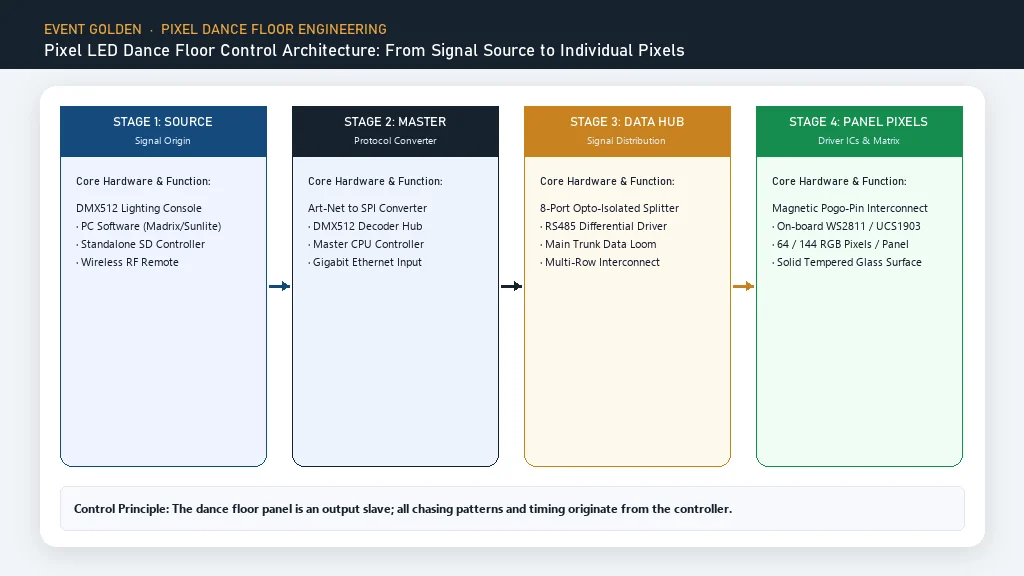
The Control Chain: Signal Source to LED Pixel
Think of the control system as four stages. The signal source is whatever tells the floor what to do: a wireless remote, a tablet app, a sound feed, or a lighting console. The controller receives that instruction and converts it into the data format the panels understand. The distribution path carries that data from panel to panel, usually through the same connectors that lock the tiles together. The driver electronics inside each panel finally convert digital data into light.
Each stage can become the bottleneck: a floor with excellent LEDs and a controller that only runs fixed patterns will disappoint a client who wants a branded look, and a thin data path can drop tiles at the far end of a large layout. Evaluate all four stages, not just the tiles.
This is why the pixel LED dance floor product page lists control as a specification and not a marketing line. A control method on a spec sheet is a starting point; the real question is which source drives which effect, and how the system behaves when a source is removed.
Fact: BiaoMing (Event Golden) lists Sound-Activated, DMX512, and Wireless Remote as the control methods on its pixel LED dance floor specification sheet, with an IP67 rating.
The Five Control Levels Buyers Are Quoted
Suppliers describe control in loose language. "Full control," "smart control," and "DMX ready" can mean very different things. Sort every quote into one of five levels, and the comparison becomes honest.
| Level | What it controls | Operator action | Typical use | How to verify |
|---|---|---|---|---|
| 1. Static color | Whole panel set to one color or scene | Pick a color on the remote or app | Simple washes, photo backdrops | Power on, set a color, watch for tiles that drift |
| 2. Preset effects | Built-in patterns and chases | Cycle through preset programs | Parties, weddings, general rentals | Step through every preset category live |
| 3. Sound-activated | Pattern reacts to music level | No setup beyond switching the mode on | DJ events, nightclubs | Test at show volume, not at desk volume |
| 4. DMX512 | Individual control from a lighting console | Address the floor, program cues | Theatre, concert, synchronized shows | Connect your own console and confirm addresses |
| 5. Pixel addressing and mapping | Each LED addressed individually | Map a source image onto the panel layout | Advanced effects, custom content | Demand a live demo of the exact effect |
Levels 1 to 4 turn up in most quotes and are easy to check. Level 5 is where the language gets loose, because the word "pixel" implies the hardest capability is included by default. It usually isn't. Whether a floor supports true per-pixel addressing comes down to the controller and the model, and it takes written specifications plus a live demonstration to prove.
Level 1 to 3: Static Color, Preset Effects and Sound Activation
These levels carry most rental revenue, so treat them as the foundation.
Static color. At this level the whole floor presents one color or one fixed scene. It is the simplest mode and the most reliable, which is exactly why it matters: if a controller fails mid-event, a static color is the safest fallback. A static mode that works from the remote alone, without the software or the console, is a genuinely useful feature, not a downgrade.
Preset running effects. These are the built-in chases, gradients, and pattern loops that ship with the dance floor controller, and they are the daily driver for party and wedding rentals. The number of presets matters less than their coverage: you want a calm wash, a slow chase, a fast chase, a color gradient, and a sound-reactive option.
Sound-activated mode. Here the floor reads audio level and drives the pattern with it. On most systems this is built into the same controller that runs the presets, reading from a built-in microphone. The practical risk is sensitivity: a floor that triggers on crowd noise or a dropped tray rather than the music fails at a live event. Test this mode at show volume, and ask whether the audio source is a built-in mic or a line-in feed.
Fact: BiaoMing's pixel LED dance floor product page states that the floor supports DMX512, software, and other control methods, enabling dynamic effects such as pattern display, color gradients, and flowing chase sequences.
Level 4: What DMX512 Control Actually Adds
DMX512 is a standard digital protocol for lighting control, published by the Entertainment Services and Technology Association (ESTA) as ANSI E1.11 [3]. It is the reason a dance floor can be treated as one more fixture on a professional lighting rig instead of a standalone gadget.
The value is integration and repeatability. A DMX universe carries 512 channels, each with a value from 0 to 255 [5], and a console can address the floor alongside moving heads and wash lights. That means one operator, one cue stack, and one look synchronized across the whole room, which is often the feature that wins a theatre or concert booking.
The catch is that DMX512 is a transport, not a guarantee of granularity. A floor can respond to DMX512 as a handful of zones or as a grid of individually addressed pixels, and both are honest uses of the word DMX. The channel count tells you which one you are buying, so ask for the DMX address map before you assume the finest level of control.
The LED dance floor category describes the range as magnetic modular floors with DMX512 control, which is the baseline to verify model by model. If you are choosing the supplier as well as the product, the LED dance floor manufacturer checklist covers the certifications and support questions that sit alongside the control spec.
Level 5: Pixel Mapping Explained, and Where the Claim Needs Proof
Pixel mapping sits behind the most impressive dance floor demos, and it is also the feature buyers misunderstand most often.
If every LED on the floor can be given its own data value, the floor becomes a low-resolution display, where each LED is one dot of an image. Pixel mapping is the process of telling the controller which dot is where, so a source pattern lines up with the physical layout of the tiles. Software does the translation; the controller and the panels do the rest.
Two limits follow. A floor can only display content at its own native resolution, set by the pixel density of the panels, so mapped fidelity is bounded by hardware, not software. And pixel mapping is only possible if the controller and model actually support per-pixel addressing; it is not implied by the word "pixel", or by "DMX ready."
So treat Level 5 as something to be proven rather than assumed. If a supplier says the floor can run animated logos or video-style content, ask to watch that exact effect on the model you're buying, driven by the shipping controller, and get the capability written into the order confirmation. If no demo can be arranged, assume the floor runs Level 1 to 4 and nothing more.
Why the Controller Choice Matters More Than the Panel
Two floors built from the same panel can still behave differently, because the controller is where they diverge and where support headaches begin.
The controller is the part you touch every event, so its model number belongs in your purchase decision, not just its feature list. A named, model-specific controller can be documented, replaced, and updated; an unnamed "standard controller" leaves you with no parts trail and no upgrade path. Ask for the make and model, and ask what happens if it is discontinued.
Then ask about the failure modes. When the main controller dies at an event, does the floor hold its last state, fall back to a static color, or go dark? Is there a spare you can carry in the van, and can a second controller be swapped in without re-addressing the floor? A backup controller that drops in as a replacement is the difference between a five-minute recovery and a refund conversation.
If you run multiple floor models, the magnetic LED dance floor guide is worth revisiting, because shared control hardware across a fleet reduces the spares you have to stock.
Demo and Documentation to Request Before You Order
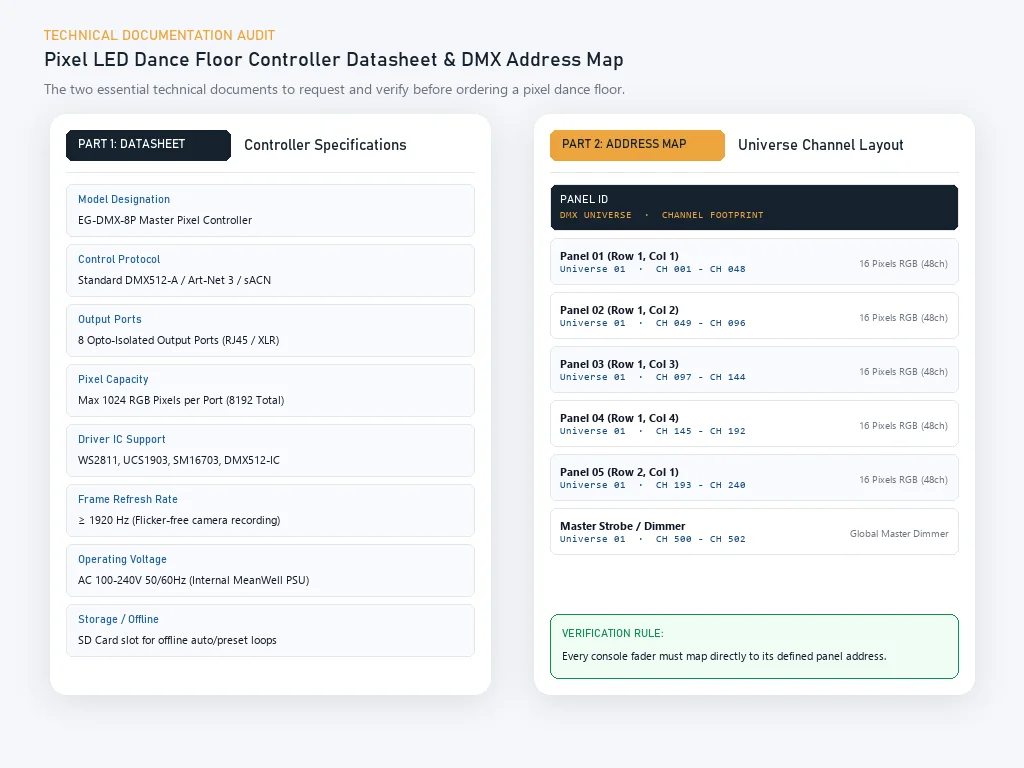
A serious supplier answers a control question with a document, not an adjective. Ask for the following six items before you commit; if any one cannot be produced, slow down.
| Item to request | Why it matters | What "good" looks like |
|---|---|---|
| Controller model and datasheet | Identifies the part you will actually operate | A named manufacturer and model number, plus a spec sheet |
| DMX address map and channel list | Tells you how finely the floor can be controlled | A table showing channels per panel and per layout |
| Wiring and data-flow diagram | Shows how data reaches the last tile | A clear diagram of controller to panel to panel |
| Software name, version and OS support | Determines whether you can run it on your gear | A named application with stated system requirements |
| Preset and pattern resolution notes | Sets expectations for effects and mapping | A list of preset categories and the panel pixel density |
| Backup and failure-degradation mode | Decides what happens when a controller dies | A written description of the fallback behaviour |
Two deserve special attention. The address map proves how granular the control really is, so insist on the channel count for your floor size. The failure-degradation note is the one almost nobody asks for, and the one that saves your event when something fails at 10 PM.
Pre-Order Written Confirmation Checklist
Verbal assurances vanish once money changes hands. Before you pay a deposit, get each line below confirmed in writing. Some specification sheets even carry two different figures for the same property, such as service life or load rating, which is why you confirm the figure for your model rather than the general page.
| # | Confirm in writing | Why it belongs on the list |
|---|---|---|
| 1 | Exact controller model that ships with the floor | Prevents a substitute controller arriving |
| 2 | Control methods included at no extra cost | Separates what is standard from what is an upsell |
| 3 | DMX channel count and address map for your layout | Defines the real granularity of control |
| 4 | Whether per-pixel mapping is supported for this model | Turns a marketing word into a yes or no |
| 5 | Software licence terms and OS compatibility | Avoids a tool your team cannot run |
| 6 | Number of presets and pattern categories | Sets a fair expectation for out-of-box effects |
| 7 | Spare controller and cable availability | Guarantees a recovery path mid-season |
| 8 | Service life, load rating and IP rating for your model | Removes ambiguity where pages conflict |
| 9 | Warranty scope: parts, labour, freight and claim process | Defines what a warranty actually pays for |
| 10 | Acceptance-test criteria and reporting window | Agrees the pass or fail rule before delivery |
Item 8 is not bureaucracy. Every physical property on that line has a number, and you want the number for the model you are buying, sourced in writing. Where installation load and electrical safety are involved, those specifics must be confirmed on site by qualified professionals.
On-Site Acceptance Test After Delivery
The order confirmation is a promise. The acceptance test is where you check it. Run this sequence before the floor goes on a paid job, and log the results.
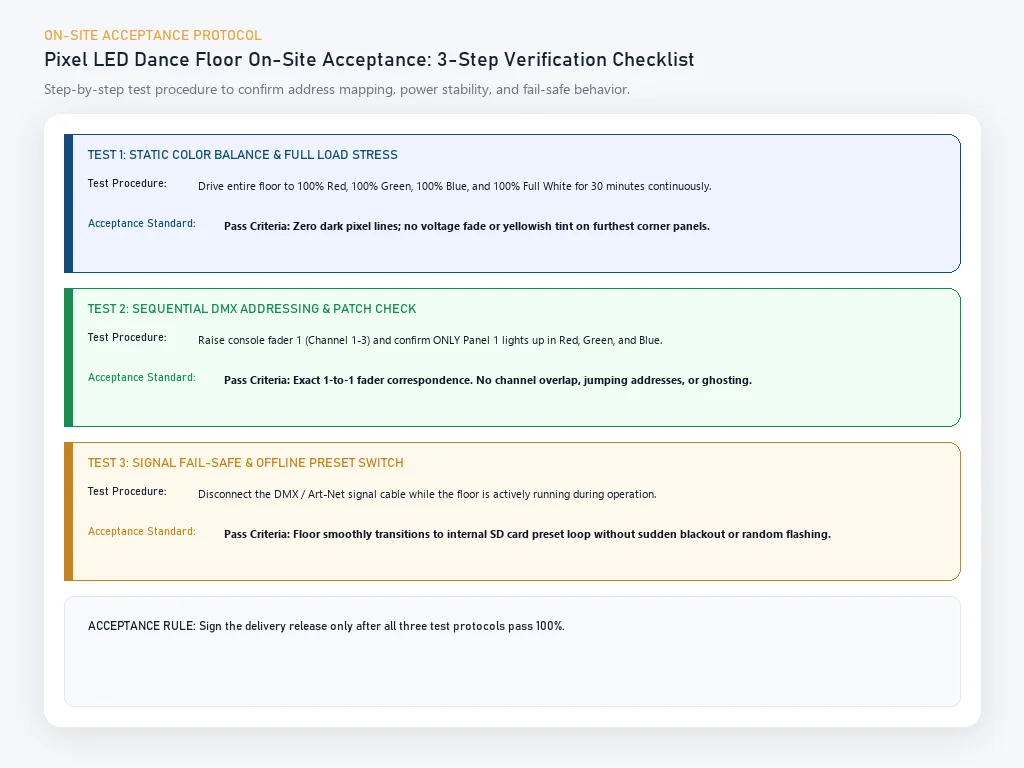
- Power and light check. Power every panel and confirm every tile lights with no dead or dim sections. A dark or half-lit tile is usually a connection fault.
- Full color cycle. Run a complete color cycle and watch for tiles that drift in brightness or hue, which points to mismatched driver calibration.
- Preset walkthrough. Step through every preset category and confirm each plays as described in the documentation.
- Sound-activated check. Test the sound mode at the volume a real event reaches, and confirm the trigger tracks the music rather than ambient noise.
- DMX integration. Connect your own console, address the floor to the channel map you received, and confirm it responds to those exact addresses.
- Mapping demo, if ordered. If per-pixel mapping was part of the deal, run the effect you were shown and confirm it reproduces on the delivered hardware.
- Failure-degradation test. Disconnect the main controller and confirm the floor behaves as the written fallback note describes.
- Spares check. Confirm the spare controller and cables are present and that a replacement can be swapped in without re-addressing.
Document the outcome of every step. A test that is not written down did not happen.
Where Control Claims Go Wrong: Five Warning Signs
Most control disappointments trace back to one of five patterns.
- "Full pixel control" with no controller model. If per-pixel control is real, the supplier can name the controller and show the address map. If not, the claim is a buzzword.
- A demo that uses different hardware. An effect shown on a flagship controller proves nothing about the controller you will receive.
- No written channel count. "DMX compatible" says nothing about granularity, so you cannot predict what the floor will do on your console.
- Conflicting numbers on the page. When one product page lists two values for a property, confirm every specification in writing for your model.
- No answer on failure behaviour. A supplier who has never thought about what happens when the controller dies has not supported a real rental fleet.
FAQ
What does pixel LED dance floor control actually mean?
It is the system that decides what the floor does once it is powered on. Control is a chain: a signal source, a controller, a data path through the panels, and the driver electronics inside each panel. How far down that chain the manufacturer has built decides what your floor can do.
What is the difference between DMX512 and pixel mapping on a dance floor?
DMX512 is a standard protocol for lighting control that lets a console send channel values to the floor over a wired or wireless link. Pixel mapping only exists if every individual LED can be addressed separately and software can map a source image onto their physical positions. A floor can support one without the other.
Can a pixel LED dance floor play video or show a logo?
Do not assume it can, and do not accept a verbal yes. Video playback and full-logo display need per-pixel addressing plus a controller and software that can map an image at native resolution. Whether a model does this depends on the controller and the model, not on the word pixel. Ask for a live demo and get it in writing.
What should I ask a supplier for before buying a DMX dance floor?
Ask for six things in writing: the controller model and datasheet, a DMX address map and channel list, the data-flow diagram, the control software name and version, the number of presets and pattern resolution, and the backup and failure-degradation mode.
How many preset effects should a dance floor controller include?
There is no universal number, and a larger count is not automatically better. What matters is whether the presets cover the scenes you rent for: solid color washes, slow and fast chases, color gradients, and a sound-reactive mode. Ask for the preset categories rather than one figure.
Does sound-activated control need a separate controller?
Not always. On many systems the sound-activated mode is built into the same controller that handles presets and reads level from a built-in microphone; on others it is a software function. Ask where the audio input lives and how sensitive the trigger is.
How do I test a pixel dance floor's control system on delivery?
Run a staged acceptance test before the floor goes on a paid job. Power every panel, run a full color cycle, step through each preset, test sound activation at show volume, connect your own console and confirm the DMX addresses, then disconnect the main controller to check the fallback behaviour.
Conclusion
Control is where a pixel dance floor is won or lost, and it is the part of the quote most buyers leave vague. Sort every supplier into the five levels, insist on the controller model and the address map, and confirm the conflicting specification lines in writing before you pay.
The buyers who avoid control surprises are rarely the ones who read the longest feature list. They are the ones who watched a live demonstration on the exact configuration, wrote down the channel count, and knew what the floor would do the day a controller failed.
Fact: BiaoMing has 13 years of manufacturing experience and exports LED dance floors to over 200 countries, with North America at 55% of sales and Western Europe at 17%, backed by a 5-year warranty and 20+ overseas warehouses.
To specify control method by method for your market, walk the manufacturer checklist and then contact the Event Golden team with your layout, controller requirements, and the effects you need proven before you order.
Sources
- BiaoMing (Event Golden). "Pixel Dance Floor." Event Golden product page. https://eventgolden.com/products/led-dance-floor/pixel-dance-floor: control methods, IP rating, and supported dynamic effects.
- BiaoMing (Event Golden). "LED Dance Floor." Event Golden category page. https://eventgolden.com/products/led-dance-floor/: magnetic modular construction and DMX512 control.
- Entertainment Services and Technology Association (ESTA). "Technical Standards Program." https://tsp.esta.org/: publisher of the ANSI E1.11 DMX512 standard.
- Artistic Licence Engineering Ltd. "Art-Net." https://art-net.org.uk/: Ethernet transport of DMX512 and RDM lighting data over a networked rig.
- Wikipedia. "DMX512." https://en.wikipedia.org/wiki/DMX512: the 512-channel universe, 0 to 255 channel values, and ESTA/ANSI E1.11 background.
Ready to start your event business?
Get a free wholesale quote within 24 hours. Product details are confirmed by direct inquiry.
Get a Free Quote